

Wallet Types
A Deposit Wallet is the default smart wallet for trading on Polymarket. Your wallet type depends on how and when the account wallet was created.
A Deposit Wallet owner can give a separate signer scoped, time-limited trading
access. See Session Keys to authorize the signer and
use its credentials.
Connect Your Account
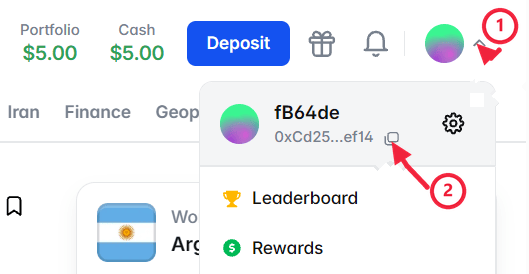
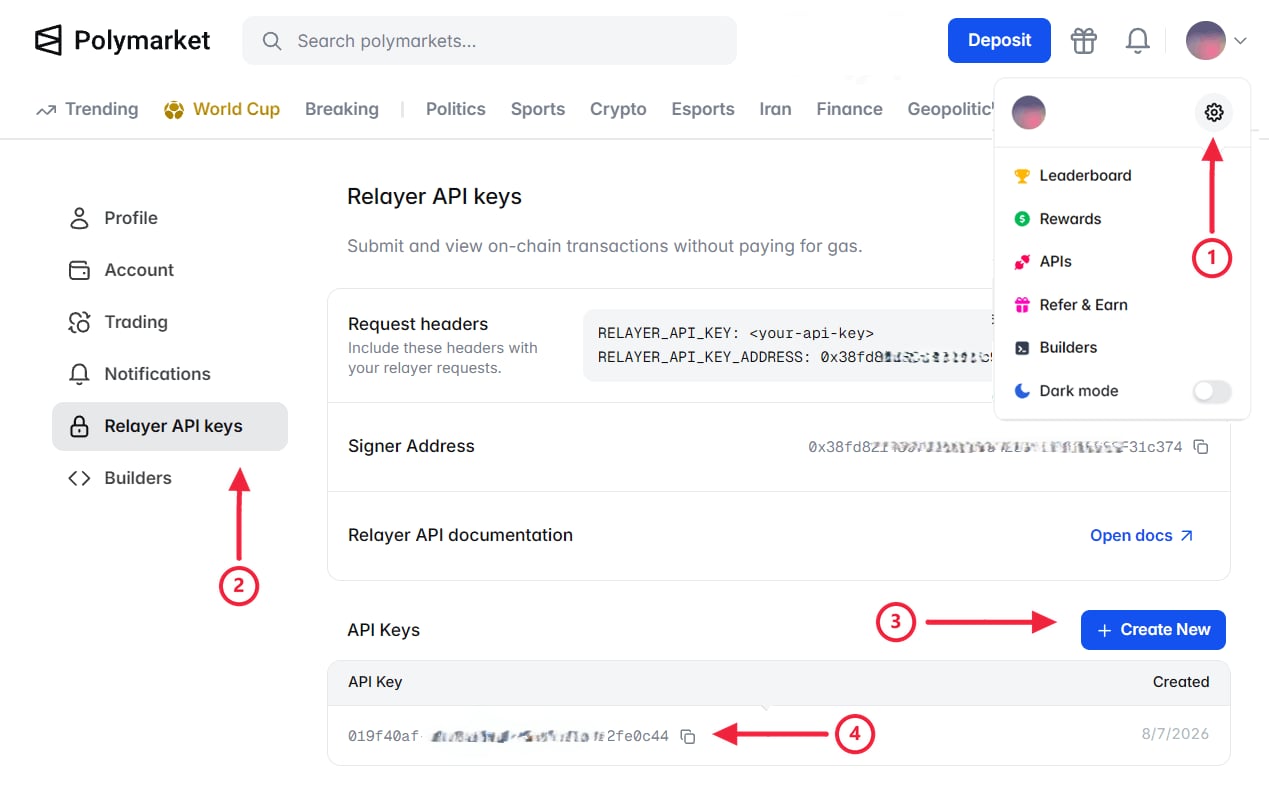
Connect an existing polymarket.com account to trade with its funds and positions. Copy the account wallet address from the profile menu: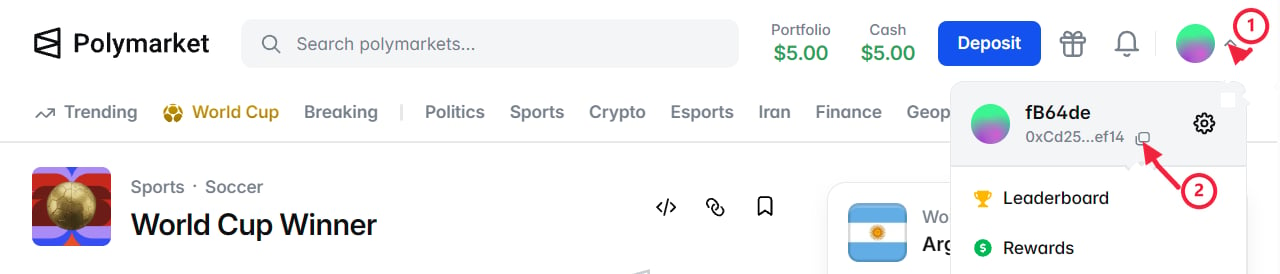
- TypeScript
- Python
- API
With the wallet address and Relayer API key ready, connect the account with
You have connected your account.
createSecureClient.1
Create a Secure Client
First, provide the signer and account wallet. Include the Relayer API
key to authorize gasless wallet operations.
This example uses Viem with a private key. See Wallet
Integrations to connect a
signer from another supported wallet library.
2
Inspect the Account
Then, inspect the resolved account identity and wallet type.
client.account contains the signer, account wallet, and wallet type for the session.Create New Accounts
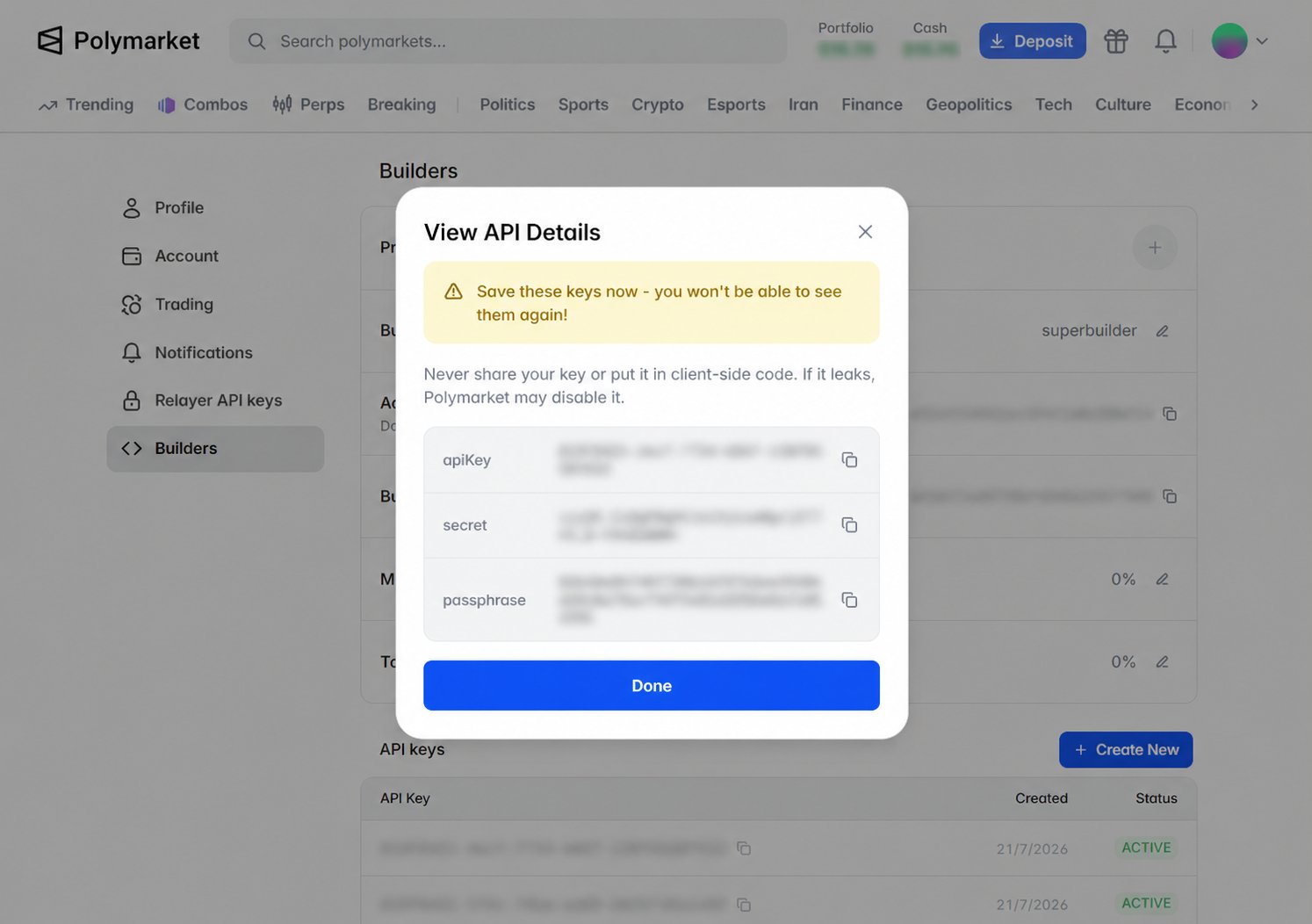
Create a polymarket.com account to serve as your builder account. It represents your integration and owns the builder profile and API credentials used to create Deposit Wallets for your users. Each wallet remains controlled by its signer. In the builder account, open polymarket.com → Settings → Builders and create an API key: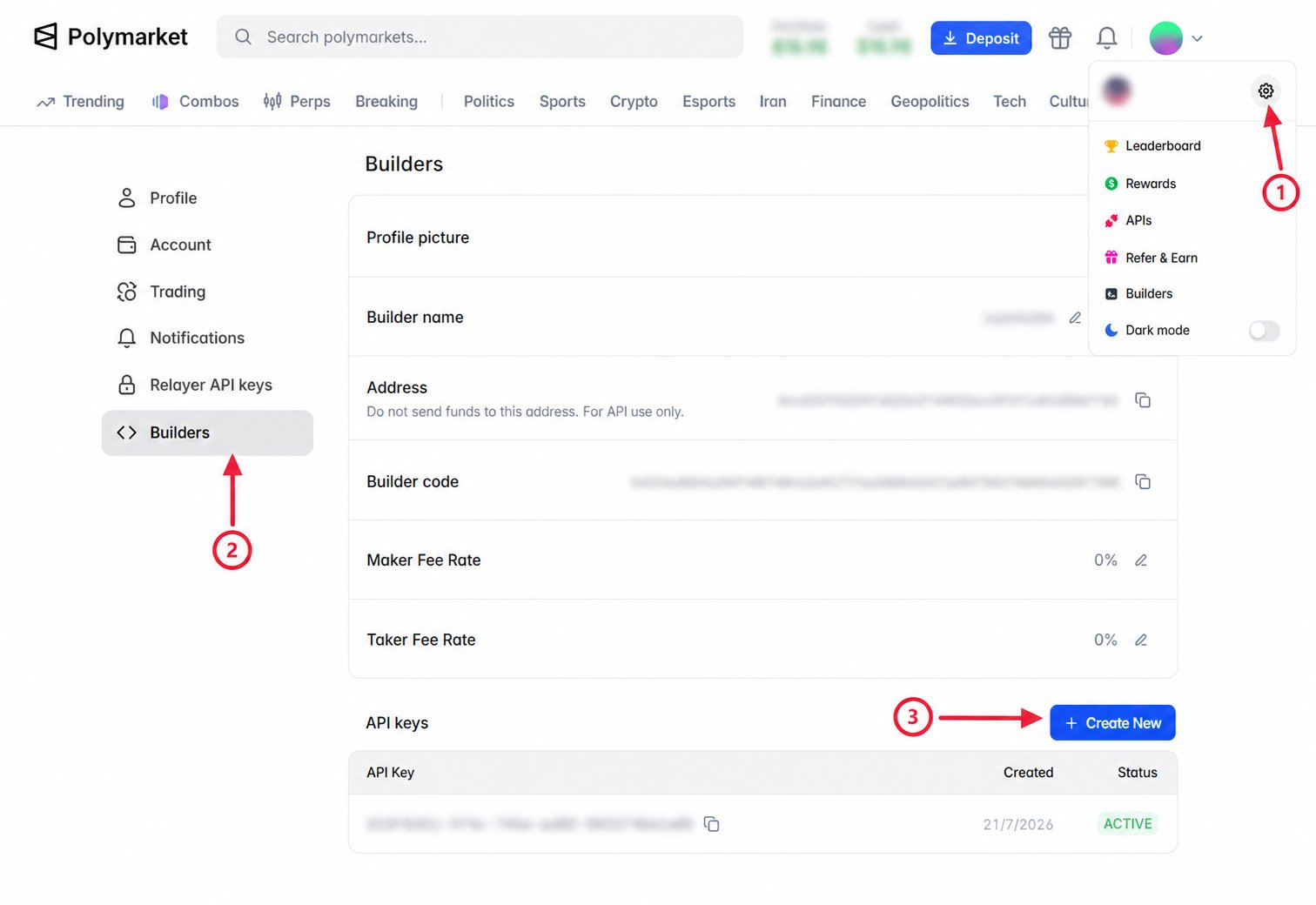
- TypeScript
- Python
- API
With the Builder API key ready, create the new account with
You have created the new account.
createSecureClient.1
Create a Deposit Wallet
First, create a
SecureClient with the signer and Builder API key. The SDK
derives the signer’s Deposit Wallet address and deploys the wallet
automatically.This example uses Viem with a private key. See Wallet
Integrations to connect a
signer from another supported wallet library.
2
Inspect the Account
Then, inspect the resolved account identity and wallet type.
client.account contains the signer, account wallet, and wallet type for the session.Execute Gasless Transactions
Approve token spending, transfer funds, and manage positions from the account wallet without paying gas.- TypeScript
- Python
- API
SecureClient provides named methods for supported wallet actions. Most
return a TransactionHandle when awaited. Call .wait() on the handle to
wait for the action to settle. setupTradingApprovals() returns a
Promise<void> and waits for completion internally, so await it directly.Create a SecureClient with either a Relayer or Builder API key:Approve ERC-20 spendingSet an allowance for a contract to spend an ERC-20 token from the account
wallet. Pass
"max" to approve the maximum amount.approved to false to revoke access.amount is expressed in the
token’s base units.Set Up Trading Approvals
Set up the ERC-20 and ERC-1155 approvals that allow Polymarket’s exchange contracts to spend the account wallet’s pUSD and outcome tokens when placing orders. For Deposit Wallets, Safe Wallets, and Proxy Wallets, these approvals are submitted as a gasless transaction. Orders on CTF negative-risk markets also require pUSD and outcome token approvals for the Neg Risk Adapter. The CLOB rejects buy orders without the pUSD approval and sell orders without the outcome token approval.- TypeScript
- Python
- API
Create a Call The method covers both position systems. It checks existing approvals and
submits only what is missing, so it is safe to call more than once.Order placement can recover from missing exchange allowances automatically. Setting them up in advance keeps that work out of your first order.Neither The first call approves pUSD for buy orders. The second approves Conditional
Tokens for sell orders.Both methods return promises that resolve after submission. Call each returned
handle’s
SecureClient with either a Relayer or Builder API key:setupTradingApprovals() to configure the required allowances:setupTradingApprovals() nor automatic recovery grants the Neg Risk
Adapter approvals. Submit them with approveErc20() and
approveErc1155ForAll():wait() to confirm the approvals before placing orders.
setupTradingApprovals() waits for its approval transactions internally.Advanced Options
Explore additional wallet and authentication patterns for advanced integrations.Derive a Deposit Wallet Address
If you need to compute a Deposit Wallet address before deployment, use the deterministic derivation algorithm below.Deposit Wallets deployed before the June 29, 2026 upgrade use a UUPS proxy.
Deposit Wallets deployed after the upgrade use a beacon proxy. The following
algorithm derives the address for a new Deposit Wallet with a beacon proxy.
Set Up EOA Trading
If your EOA is allowlisted for trading, use it as the account wallet. Every onchain action, including token approvals, ERC-20 transfers, splits, merges, and redemptions, is submitted directly from the EOA and requires POL for gas.- TypeScript
- Python
- API
Pass the signer address as Methods such as
wallet. The SDK identifies the account as an
EOA and skips Deposit Wallet deployment.approveErc20(), approveErc1155ForAll(), transferErc20(),
and the position lifecycle methods submit transactions directly from the
signer. For example, set up every required trading approval:Remote Builder Signing
Remote Builder Signing keeps Builder API credentials on your server while a TypeScript client requests signed headers for Builder-authenticated actions.1
Create a Signing Endpoint
Authenticate and authorize the caller on your server, then sign the request
details supplied by the client.
2
Connect the Client
Pass the user’s signer and the signing endpoint to the client. Authenticate
signing requests with the application’s session credentials or custom
headers.The Builder API credentials remain on the server. The client receives only the headers for the request being authorized.
Opt Out of Beacon Upgrades
Deposit Wallets deployed after June 29, 2026 use an ERC-1967 beacon proxy. This proxy pattern resolves the implementation for multiple wallets through a shared beacon, allowing Polymarket to send implementation upgrades without changing their addresses. The wallet owner can instead pin the wallet to the implementation that is current when it opts out. The owner-only calls below are submitted directly and require POL for gas.1
Pause the Wallet
Send a direct onchain transaction from the wallet owner to call
pause() on
the Deposit Wallet.2
Wait for the Timelock
Read
timelockDelay() from the Deposit Wallet factory and wait until that
interval has elapsed after the wallet was paused.3
Opt Out
Send another transaction from the wallet owner to call
optOut() on the
Deposit Wallet. This pins the wallet to the beacon implementation that is
current when the transaction executes.4
Unpause the Wallet
Call
unpause() from the wallet owner to clear the paused state.optIn(), and then unpause the wallet. Review the beacon’s current default
implementation before opting back in.