
This guide walks you through placing an order on Polymarket using your own wallet.

Installation

npm install @polymarket/clob-client ethers@5

Step 1: Initialize Client with Private Key

import { ClobClient } from "@polymarket/clob-client";
import { Wallet } from "ethers"; // v5.8.0

const HOST = "https://clob.polymarket.com";
const CHAIN_ID = 137; // Polygon mainnet
const signer = new Wallet(process.env.PRIVATE_KEY);

const client = new ClobClient(HOST, CHAIN_ID, signer);

Step 2: Derive User API Credentials

Your private key is used once to derive API credentials. These credentials authenticate all subsequent requests.
// Get existing API key, or create one if none exists
const userApiCreds = await client.createOrDeriveApiKey();

console.log("API Key:", userApiCreds.apiKey);
console.log("Secret:", userApiCreds.secret);
console.log("Passphrase:", userApiCreds.passphrase);

Step 3: Configure Signature Type and Funder

Before reinitializing the client, determine your signature type and funder address:
How do you want to trade?TypeValueFunder Address
I want to use an EOA wallet. It holds USDCe and position tokens, and I’ll pay my own gas.EOA0Your EOA wallet address
I want to trade through my Polymarket.com account (Magic Link email/Google login).POLY_PROXY1Your proxy wallet address
I want to trade through my Polymarket.com account (browser wallet connection).GNOSIS_SAFE2Your proxy wallet address
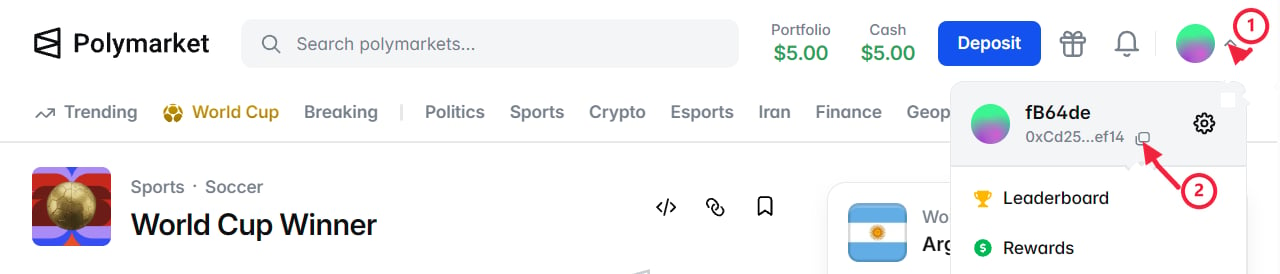
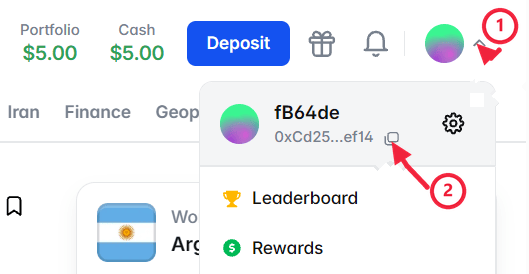
If you have a Polymarket.com account, your funds are in a proxy wallet (visible in the profile dropdown). Use type 1 or 2. Type 0 is for standalone EOA wallets only.

Step 4: Reinitialize with Full Authentication

// Choose based on your wallet type (see table above)
const SIGNATURE_TYPE = 0; // EOA example
const FUNDER_ADDRESS = signer.address; // For EOA, funder is your wallet

const client = new ClobClient(
  HOST,
  CHAIN_ID,
  signer,
  userApiCreds,
  SIGNATURE_TYPE,
  FUNDER_ADDRESS
);
Do not use Builder API credentials in place of User API credentials! Builder credentials are for order attribution, not user authentication. See Builder Order Attribution.

Step 5: Place an Order

Now you’re ready to trade! First, get a token ID from the Gamma API.
import { Side, OrderType } from "@polymarket/clob-client";

// Get market info first
const market = await client.getMarket("TOKEN_ID");

const response = await client.createAndPostOrder(
  {
    tokenID: "TOKEN_ID",
    price: 0.50,        // Price per share ($0.50)
    size: 10,           // Number of shares
    side: Side.BUY,     // BUY or SELL
  },
  {
    tickSize: market.tickSize,
    negRisk: market.negRisk,    // true for multi-outcome events
  },
  OrderType.GTC  // Good-Til-Cancelled
);

console.log("Order ID:", response.orderID);
console.log("Status:", response.status);

Step 6: Check Your Orders

// View all open orders
const openOrders = await client.getOpenOrders();
console.log(`You have ${openOrders.length} open orders`);

// View your trade history
const trades = await client.getTrades();
console.log(`You've made ${trades.length} trades`);

// Cancel an order
await client.cancelOrder(response.orderID);

Troubleshooting

Wrong private key, signature type, or funder address for the derived User API credentials.Double check the following values when creating User API credentials via createOrDeriveApiKey():
  • Do not use Builder API credentials in place of User API credentials
  • Check signatureType matches your account type (0, 1, or 2)
  • Ensure funder is correct for your wallet type
Wrong API key, secret, or passphrase.Re-derive credentials with createOrDeriveApiKey() and update your config.
Either not enough USDCe / position tokens in your funder address, or you lack approvals to spend your tokens.
  • Deposit USDCe to your funder address.
  • Ensure you have more USDCe than what’s committed in open orders.
  • Check that you’ve set all necessary token approvals.
You’re trying to place a trade from a restricted region.See Geographic Restrictions for details.

Adding Builder API Credentials

If you’re building an app that routes orders for your users, you can add builder credentials to get attribution on the Builder Leaderboard:
TypeScript
import { BuilderConfig, BuilderApiKeyCreds } from "@polymarket/builder-signing-sdk";

const builderCreds: BuilderApiKeyCreds = {
  key: process.env.POLY_BUILDER_API_KEY!,
  secret: process.env.POLY_BUILDER_SECRET!,
  passphrase: process.env.POLY_BUILDER_PASSPHRASE!,
};

const builderConfig = new BuilderConfig({ localBuilderCreds: builderCreds });

// Add builderConfig as the last parameter
const client = new ClobClient(
  HOST, 
  CHAIN_ID, 
  signer, 
  userApiCreds, 
  signatureType, 
  funderAddress,
  undefined, 
  false, 
  builderConfig
);
Builder credentials are separate from user credentials. You use your builder credentials to tag orders, but each user still needs their own L2 credentials to trade.

Full Builder Guide

Complete documentation for order attribution and gasless transactions