

- TypeScript
- Python
- API
给定一个市场,读取其结果代币 ID:
const yesTokenId = market.outcomes.yes.tokenId!;
const noTokenId = market.outcomes.no.tokenId!;
给定一个市场,读取其结果代币 ID:
if market.outcomes.yes.token_id is None or market.outcomes.no.token_id is None:
    raise RuntimeError("Market token IDs not found")

yes_token_id = market.outcomes.yes.token_id
no_token_id = market.outcomes.no.token_id
给定一个市场对象,其结果代币 ID 存储为 JSON 编码的数组:解析该数组,然后选择你要交易的结果:
{
  "clobTokenIds": "[\"<yes_token_id>\", \"<no_token_id>\"]"
}
TOKEN_ID="<yes_token_id>"
限价单
限价单指定你愿意成交的价格,并可挂在订单簿上,直至成交、到期或被你取消。 当控制价格比立即执行更重要时,请使用限价单。 限价单还会定义未成交数量保持有效的时长:| 有效期 | 行为 | 适用场景 |
|---|---|---|
| 取消前有效 (GTC) | 保持有效,直至成交或被你取消。 | 订单没有截止时间。 |
| 指定日期前有效 (GTD) | 保持有效,直至你指定的到期时间。 | 订单应在某个已知事件前到期。 |
出于安全阈值考虑,GTD 订单会在标明的到期时间前一分钟失效。若要设置 N 秒的
实际有效期,请使用
now + 60 + N。此外,到期时间必须至少在未来 3
分钟;更早到期的订单会被拒绝,因此最短实际有效期约为两分钟。下限价单
- TypeScript
- Python
- API
给定一个
SecureClient,下限价单并检查响应:1
下单
首先,使用价格和份额数调用 两个示例都以每份
placeLimitOrder()。价格必须符合市场的最小价格增量,
数量必须达到最小订单数量。GTC 订单省略 expiration;GTD 订单则提供以秒为单位的
Unix 时间戳。import { OrderSide } from "@polymarket/client";
const response = await client.placeLimitOrder({
tokenId: yesTokenId,
side: OrderSide.BUY,
price: "0.52",
size: "10",
});
// response: OrderResponse
import { OrderSide } from "@polymarket/client";

const expiration = Math.floor(Date.now() / 1000) + 60 + 60 * 60;
const response = await client.placeLimitOrder({
  tokenId: yesTokenId,
  side: OrderSide.BUY,
  price: "0.52",
  size: "10",
  expiration,
});

// response: OrderResponse
0.52 USD 的价格买入 10 份。GTD 订单的实际有效期为一小时。2
检查响应
然后,检查 接受订单的响应包含订单 ID 和以下状态之一。如果订单全部或部分成交,
被拒绝的订单返回
response.ok 以确定 CLOB 是否接受了订单:if (response.ok) {
console.log(response.orderId, response.status);
console.log(response.tradeIds, response.transactionsHashes);
} else {
console.error(response.code, response.message);
}
tradeIds 集合会标识由此产生的交易;如有可用信息,transactionsHashes
会包含这些交易的交易哈希:| 状态 | 说明 |
|---|---|
live | 订单正在订单簿上挂单。 |
matched | 订单立即与订单簿上的流动性撮合。 |
delayed | 订单可成交,但受到撮合延迟。 |
ok: false,并附带代码和消息。给定一个
AsyncSecureClient,下限价单并检查响应。同步 SecureClient
提供相同的方法。1
下单
首先,使用价格和份额数调用 两个示例都以每份
place_limit_order()。价格必须符合市场的最小价格增量,
数量必须达到最小订单数量。GTC 订单省略 expiration;GTD 订单则提供以秒为单位的
Unix 时间戳。response = await client.place_limit_order(
token_id=yes_token_id,
side="BUY",
price="0.52",
size="10",
)
# response: OrderResponse
import time

expiration = int(time.time()) + 60 + 60 * 60
response = await client.place_limit_order(
    token_id=yes_token_id,
    side="BUY",
    price="0.52",
    size="10",
    expiration=expiration,
)

# response: OrderResponse
0.52 USD 的价格买入 10 份。GTD 订单的实际有效期为一小时。2
检查响应
然后,检查 接受订单的响应包含订单 ID 和以下状态之一。如果订单全部或部分成交,
被拒绝的订单返回
response.ok 以确定 CLOB 是否接受了订单:if response.ok:
print(response.order_id, response.status)
print(response.trade_ids, response.transactions_hashes)
else:
print(response.code, response.message)
trade_ids 集合会标识由此产生的交易;如有可用信息,transactions_hashes
会包含这些交易的交易哈希:| 状态 | 说明 |
|---|---|
live | 订单正在订单簿上挂单。 |
matched | 订单立即与订单簿上的流动性撮合。 |
delayed | 订单可成交,但受到撮合延迟。 |
ok=False,并附带代码和消息。根据价格和数量构建限价单,然后签名并提交:
1
读取市场上下文
首先,获取当前订单簿,以读取市场的交易约束和交易所类型:其中:
curl "https://clob.polymarket.com/book?token_id=$TOKEN_ID"
{
  "asset_id": "<yes_token_id>",
  "bids": [{ "price": "0.50", "size": "40" }],
  "asks": [{ "price": "0.54", "size": "30" }],
  "min_order_size": "5",
  "tick_size": "0.01",
  "neg_risk": false
}
min_order_size是 CLOB 接受的单笔订单最小份额数。neg_risk表示市场是否属于负风险组, 从而在签名和提交订单时使用 Neg Risk Exchange 合约。
2
计算订单金额
然后,选择符合
两个方向对价格和数量的映射方式不同:
tick_size 的价格和达到 min_order_size 的份额数量。
使用最小变动价位确定所需精度:| 最小变动价位 | 价格小数位数 | 数量小数位数 | 金额小数位数 |
|---|---|---|---|
0.1 | 1 | 2 | 3 |
0.01 | 2 | 2 | 4 |
0.005 | 3 | 2 | 5 |
0.0025 | 4 | 2 | 6 |
0.001 | 3 | 2 | 5 |
0.0001 | 4 | 2 | 6 |
如果你的集成会存储
tick_size 供后续订单使用,请监听市场
数据流上的 tick_size_change
事件,并在其变化时替换已存储的值。CLOB
会拒绝价格不符合市场当前最小变动价位的订单。- 对于 BUY,
makerAmount是price × sizeUSD,takerAmount是份额数。 - 对于 SELL,
makerAmount是份额数,takerAmount是price × sizeUSD。
- 价格使用不超过价格小数位数的小数位。
- 将份额数量向下舍入至数量小数位数。
- 计算 USD 金额。如果超过金额小数位数,先向上舍入至 金额小数位数 + 4,再向下舍入至金额小数位数。
3
验证并编码金额
接下来,确认舍入后的份额数量仍达到
min_order_size,然后将两个金额转换为
六位小数精度的整数。以 0.52 的价格 BUY 10 份时,USD 金额为 5.20,份额数量高于最低值 5。
编码后的值为:{
"makerAmount": "5200000",
"takerAmount": "10000000"
}
4
选择交易所和签名路径
然后,使用第一步中订单簿返回的
然后,根据账户钱包确定其余占位符:
neg_risk 值,选择用作 EIP-712
验证合约的 Exchange 合约:| 市场 | exchange_address |
|---|---|
| 标准 | 0xE111180000d2663C0091e4f400237545B87B996B |
| 负风险 | 0xe2222d279d744050d28e00520010520000310F59 |
| 钱包 | signature_type | maker_address | order_signer_address |
|---|---|---|---|
| 存款钱包 | 3 | 存款钱包地址 | 存款钱包地址 |
| 代理钱包 | 1 | 代理钱包地址 | 账户签名者地址 |
| Safe 钱包 | 2 | Safe 钱包地址 | 账户签名者地址 |
| EOA | 0 | EOA 地址 | EOA 地址 |
5
创建订单类型化数据
接下来,为所选钱包创建 EIP-712 类型化数据:其中:
{
  "domain": {
    "name": "Polymarket CTF Exchange",
    "version": "2",
    "chainId": 137,
    "verifyingContract": "<exchange_address>"
  },
  "types": {
    "Order": [
      { "name": "salt", "type": "uint256" },
      { "name": "maker", "type": "address" },
      { "name": "signer", "type": "address" },
      { "name": "tokenId", "type": "uint256" },
      { "name": "makerAmount", "type": "uint256" },
      { "name": "takerAmount", "type": "uint256" },
      { "name": "side", "type": "uint8" },
      { "name": "signatureType", "type": "uint8" },
      { "name": "timestamp", "type": "uint256" },
      { "name": "metadata", "type": "bytes32" },
      { "name": "builder", "type": "bytes32" }
    ],
    "TypedDataSign": [
      { "name": "contents", "type": "Order" },
      { "name": "name", "type": "string" },
      { "name": "version", "type": "string" },
      { "name": "chainId", "type": "uint256" },
      { "name": "verifyingContract", "type": "address" },
      { "name": "salt", "type": "bytes32" }
    ]
  },
  "primaryType": "TypedDataSign",
  "message": {
    "contents": {
      "salt": "479249096354",
      "maker": "<maker_address>",
      "signer": "<order_signer_address>",
      "tokenId": "<yes_token_id>",
      "makerAmount": "5200000",
      "takerAmount": "10000000",
      "side": 0,
      "signatureType": 3,
      "timestamp": "<unix_milliseconds>",
      "metadata": "0x0000000000000000000000000000000000000000000000000000000000000000",
      "builder": "0x0000000000000000000000000000000000000000000000000000000000000000"
    },
    "name": "DepositWallet",
    "version": "1",
    "chainId": 137,
    "verifyingContract": "<maker_address>",
    "salt": "0x0000000000000000000000000000000000000000000000000000000000000000"
  }
}
{
  "domain": {
    "name": "Polymarket CTF Exchange",
    "version": "2",
    "chainId": 137,
    "verifyingContract": "<exchange_address>"
  },
  "types": {
    "Order": [
      { "name": "salt", "type": "uint256" },
      { "name": "maker", "type": "address" },
      { "name": "signer", "type": "address" },
      { "name": "tokenId", "type": "uint256" },
      { "name": "makerAmount", "type": "uint256" },
      { "name": "takerAmount", "type": "uint256" },
      { "name": "side", "type": "uint8" },
      { "name": "signatureType", "type": "uint8" },
      { "name": "timestamp", "type": "uint256" },
      { "name": "metadata", "type": "bytes32" },
      { "name": "builder", "type": "bytes32" }
    ]
  },
  "primaryType": "Order",
  "message": {
    "salt": "479249096354",
    "maker": "<maker_address>",
    "signer": "<order_signer_address>",
    "tokenId": "<yes_token_id>",
    "makerAmount": "5200000",
    "takerAmount": "10000000",
    "side": 0,
    "signatureType": 1,
    "timestamp": "<unix_milliseconds>",
    "metadata": "0x0000000000000000000000000000000000000000000000000000000000000000",
    "builder": "0x0000000000000000000000000000000000000000000000000000000000000000"
  }
}
- BUY 的
side为0,SELL 的side为1。 - 每个订单都应使用新的随机
salt值。由于请求正文会将其序列化为 JSON 数字, JavaScript 集成应确保该值不超过Number.MAX_SAFE_INTEGER。
6
签署订单
然后,使用账户签名者签署类型化数据。存款钱包需要封装原始签名以进行 ERC-7739
验证。代理钱包、Safe 钱包和 EOA 则提交直接签署 Exchange
Order
类型化数据后返回的标准签名。请参阅以下使用 Viem 的示例:import { privateKeyToAccount } from "viem/accounts";
const signer = privateKeyToAccount(process.env.SIGNER_PRIVATE_KEY);
const innerSignature = await signer.signTypedData(typedData);
const signature = wrapDepositWalletSignature(typedData, innerSignature);
import { privateKeyToAccount } from "viem/accounts";

const signer = privateKeyToAccount(process.env.SIGNER_PRIVATE_KEY);
const signature = await signer.signTypedData(typedData);
import { concatHex, encodeAbiParameters, keccak256, toHex } from "viem";

const ORDER_TYPE =
  "Order(uint256 salt,address maker,address signer,uint256 tokenId,uint256 makerAmount,uint256 takerAmount,uint8 side,uint8 signatureType,uint256 timestamp,bytes32 metadata,bytes32 builder)";
const EIP712_DOMAIN_TYPE =
  "EIP712Domain(string name,string version,uint256 chainId,address verifyingContract)";

function wrapDepositWalletSignature(typedData, innerSignature) {
  const order = typedData.message.contents;
  const exchangeDomain = typedData.domain;

  const appDomainSeparator = keccak256(
    encodeAbiParameters(
      [
        { type: "bytes32" },
        { type: "bytes32" },
        { type: "bytes32" },
        { type: "uint256" },
        { type: "address" },
      ],
      [
        keccak256(toHex(EIP712_DOMAIN_TYPE)),
        keccak256(toHex(exchangeDomain.name)),
        keccak256(toHex(exchangeDomain.version)),
        BigInt(exchangeDomain.chainId),
        exchangeDomain.verifyingContract,
      ],
    ),
  );
  const contentsHash = keccak256(
    encodeAbiParameters(
      [
        { type: "bytes32" },
        { type: "uint256" },
        { type: "address" },
        { type: "address" },
        { type: "uint256" },
        { type: "uint256" },
        { type: "uint256" },
        { type: "uint8" },
        { type: "uint8" },
        { type: "uint256" },
        { type: "bytes32" },
        { type: "bytes32" },
      ],
      [
        keccak256(toHex(ORDER_TYPE)),
        BigInt(order.salt),
        order.maker,
        order.signer,
        BigInt(order.tokenId),
        BigInt(order.makerAmount),
        BigInt(order.takerAmount),
        order.side,
        order.signatureType,
        BigInt(order.timestamp),
        order.metadata,
        order.builder,
      ],
    ),
  );

  return concatHex([
    innerSignature,
    appDomainSeparator,
    contentsHash,
    toHex(ORDER_TYPE),
    toHex(ORDER_TYPE.length, { size: 2 }),
  ]);
}
7
提交订单
在最终请求正文中选择未成交订单保持有效的时长。对于 GTC 订单,将 使用 API 身份验证中的签名者地址和
CLOB API 凭据,创建新的
orderType
设为 "GTC",将 expiration 设为 "0"。对于 GTD 订单,将 orderType
设为 "GTD",并将 expiration 设为以秒为单位的 Unix 时间戳。curl -X POST "https://clob.polymarket.com/order" \
-H "Content-Type: application/json" \
-H "POLY_ADDRESS: <signer_address>" \
-H "POLY_API_KEY: <clob_api_key>" \
-H "POLY_PASSPHRASE: <clob_api_passphrase>" \
-H "POLY_SIGNATURE: <clob_l2_signature>" \
-H "POLY_TIMESTAMP: <clob_request_timestamp>" \
--data '{
"deferExec": false,
"order": {
"builder": "0x0000000000000000000000000000000000000000000000000000000000000000",
"expiration": "0",
"maker": "<maker_address>",
"makerAmount": "5200000",
"metadata": "0x0000000000000000000000000000000000000000000000000000000000000000",
"salt": 479249096354,
"side": "BUY",
"signature": "<signature>",
"signatureType": 3,
"signer": "<order_signer_address>",
"takerAmount": "10000000",
"timestamp": "<unix_milliseconds>",
"tokenId": "<yes_token_id>"
},
"orderType": "GTC",
"owner": "<clob_api_key>"
}'
curl -X POST "https://clob.polymarket.com/order" \
  -H "Content-Type: application/json" \
  -H "POLY_ADDRESS: <signer_address>" \
  -H "POLY_API_KEY: <clob_api_key>" \
  -H "POLY_PASSPHRASE: <clob_api_passphrase>" \
  -H "POLY_SIGNATURE: <clob_l2_signature>" \
  -H "POLY_TIMESTAMP: <clob_request_timestamp>" \
  --data '{
    "deferExec": false,
    "order": {
      "builder": "0x0000000000000000000000000000000000000000000000000000000000000000",
      "expiration": "<unix_timestamp_seconds>",
      "maker": "<maker_address>",
      "makerAmount": "5200000",
      "metadata": "0x0000000000000000000000000000000000000000000000000000000000000000",
      "salt": 479249096354,
      "side": "BUY",
      "signature": "<signature>",
      "signatureType": 3,
      "signer": "<order_signer_address>",
      "takerAmount": "10000000",
      "timestamp": "<unix_milliseconds>",
      "tokenId": "<yes_token_id>"
    },
    "orderType": "GTD",
    "owner": "<clob_api_key>"
  }'
<clob_request_timestamp>,并根据通过网络发送的
精确序列化正文生成 <clob_l2_signature>:body = <exact_serialized_request_body>
message = <clob_request_timestamp> + "POST" + "/order" + body
clob_l2_signature = urlsafeBase64WithPadding(
HMAC-SHA256(base64Decode(<clob_api_secret>), message)
)
8
检查响应
最后,检查 成功响应具有以下状态之一。订单全部或部分成交时,
success 以确定 CLOB 是否接受了订单。成功响应包含订单 ID
及其插入状态;失败响应则在 errorMsg 中包含原因:{
"success": true,
"errorMsg": "",
"orderID": "<order_id>",
"status": "live",
"makingAmount": "<making_amount>",
"takingAmount": "<taking_amount>",
"transactionsHashes": ["<transaction_hash>"],
"tradeIDs": ["<trade_id>"]
}
{
  "success": false,
  "errorMsg": "not enough balance / allowance",
  "orderID": "",
  "status": "",
  "makingAmount": "",
  "takingAmount": ""
}
tradeIDs 集合会标识
由此产生的交易;如有可用信息,transactionsHashes 会包含这些交易的交易哈希:| 状态 | 说明 |
|---|---|
live | 订单正在订单簿上挂单。 |
matched | 订单立即与订单簿上的流动性撮合。 |
delayed | 订单可成交,但受到撮合延迟。 |
unmatched | 订单可成交,但延迟失败;下单仍然成功。 |
仅挂单订单
仅挂单订单只会增加流动性:如果订单会立即与订单簿撮合,则会被拒绝,而不会吃单。 使用这种订单可确保你以做市商身份报价。做市商使用仅挂单订单,通过在订单簿上挂单来增加流动性。
- TypeScript
- Python
- API
给定一个
SecureClient,在下限价单时设置 postOnly:const response = await client.placeLimitOrder({
tokenId: yesTokenId,
side: OrderSide.BUY,
price: "0.52",
size: "10",
postOnly: true,
});
// response: OrderResponse
给定一个
AsyncSecureClient,在下限价单时设置 post_only。
同步 SecureClient 提供相同的方法。response = await client.place_limit_order(
token_id=yes_token_id,
side="BUY",
price="0.52",
size="10",
post_only=True,
)
# response: OrderResponse
按照下限价单中的 API 工作流操作,然后在最终请求中与 GTC 或 GTD
orderType 一同添加 postOnly: true。例如,提交一个 GTC 仅挂单订单:curl -X POST "https://clob.polymarket.com/order" \
-H "Content-Type: application/json" \
-H "POLY_ADDRESS: <signer_address>" \
-H "POLY_API_KEY: <clob_api_key>" \
-H "POLY_PASSPHRASE: <clob_api_passphrase>" \
-H "POLY_SIGNATURE: <clob_l2_signature>" \
-H "POLY_TIMESTAMP: <clob_request_timestamp>" \
--data '{
"deferExec": false,
"order": {
"builder": "0x0000000000000000000000000000000000000000000000000000000000000000",
"expiration": "0",
"maker": "<maker_address>",
"makerAmount": "5200000",
"metadata": "0x0000000000000000000000000000000000000000000000000000000000000000",
"salt": 479249096354,
"side": "BUY",
"signature": "<signature>",
"signatureType": 3,
"signer": "<order_signer_address>",
"takerAmount": "10000000",
"timestamp": "<unix_milliseconds>",
"tokenId": "<yes_token_id>"
},
"orderType": "GTC",
"owner": "<clob_api_key>",
"postOnly": true
}'
市价单
市价单与限价单使用相同的底层订单,但会根据当前订单簿流动性得出可成交价格。 因此它可以立即执行,而不是挂在订单簿上。当执行比设定精确价格更重要时,请使用市价单。 在决定买入或卖出多少之前,请阅读市场的交易 约束。下市价单
以下示例使用 Fill and Kill (FAK),它会立即成交可用流动性并取消任何剩余数量。 有关 Fill or Kill (FOK),请参阅市价单类型。- TypeScript
- Python
- API
给定一个
SecureClient,估算价格并下市价单:1
估算价格
首先,调用 在这些示例中,
estimateMarketPrice(),确定订单在当前订单簿深度下会触及的价格水平。
对于 BUY,amount 是要花费的 USD 名义金额。对于 SELL,shares
是要卖出的份额数,而不是其 USD 价值。import { OrderSide, OrderType } from "@polymarket/client";
const estimatedBuyPrice = await client.estimateMarketPrice({
tokenId: yesTokenId,
side: OrderSide.BUY,
amount: "10",
orderType: OrderType.FAK,
});
// estimatedBuyPrice: number
import { OrderSide, OrderType } from "@polymarket/client";

const estimatedSellPrice = await client.estimateMarketPrice({
  tokenId: yesTokenId,
  side: OrderSide.SELL,
  shares: "10",
  orderType: OrderType.FAK,
});

// estimatedSellPrice: number
amount: "10" 表示花费 10 USD,而 shares: "10"
表示卖出 10 份。估算结果是当前订单簿的快照。提交订单前,可用价格可能发生变化。2
下单
然后,如果估算价格可以接受,将其作为 BUY 的最高价格或 SELL 的最低价格,
并下市价单:
const response = await client.placeMarketOrder({
  tokenId: yesTokenId,
  side: OrderSide.BUY,
  amount: "10",
  maxPrice: estimatedBuyPrice,
  orderType: OrderType.FAK,
});

// response: OrderResponse
const response = await client.placeMarketOrder({
  tokenId: yesTokenId,
  side: OrderSide.SELL,
  shares: "10",
  minPrice: estimatedSellPrice,
  orderType: OrderType.FAK,
});

// response: OrderResponse
maxPrice 可防止 BUY 跨越更高价格,minPrice 可防止 SELL 跨越更低价格。
如果订单簿在提交前发生变化,订单可能仅部分成交或完全不成交。3
检查响应
最后,检查 接受订单的响应包含订单 ID 和以下状态之一。如果订单全部或部分成交,
被拒绝的订单返回
response.ok 以确定 CLOB 是否接受了订单:if (response.ok) {
console.log(response.orderId, response.status);
console.log(response.tradeIds, response.transactionsHashes);
} else {
console.error(response.code, response.message);
}
tradeIds 会标识由此产生的交易;如有可用信息,transactionsHashes
会包含这些交易的交易哈希:| 状态 | 说明 |
|---|---|
live | 订单正在订单簿上挂单。 |
matched | 订单立即与订单簿上的流动性撮合。 |
delayed | 订单可成交,但受到撮合延迟。 |
ok: false,并附带代码和消息。给定一个
AsyncSecureClient,估算价格并下市价单。同步 SecureClient
提供相同的方法。1
估算价格
首先,调用 在这些示例中,
estimate_market_price(),确定订单在当前订单簿深度下会触及的价格水平。
对于 BUY,amount 是要花费的 USD 名义金额。对于 SELL,shares
是要卖出的份额数,而不是其 USD 价值。estimated_buy_price = await client.estimate_market_price(
token_id=yes_token_id,
side="BUY",
amount="10",
order_type="FAK",
)
# estimated_buy_price: Decimal
estimated_sell_price = await client.estimate_market_price(
    token_id=yes_token_id,
    side="SELL",
    shares="10",
    order_type="FAK",
)

# estimated_sell_price: Decimal
amount="10" 表示花费 10 USD,而 shares="10"
表示卖出 10 份。估算结果是当前订单簿的快照。提交订单前,可用价格可能发生变化。2
下单
然后,如果估算价格可以接受,将其作为 BUY 的最高价格或 SELL 的最低价格,
并下市价单:
response = await client.place_market_order(
    token_id=yes_token_id,
    side="BUY",
    amount="10",
    max_price=estimated_buy_price,
    order_type="FAK",
)

# response: OrderResponse
response = await client.place_market_order(
    token_id=yes_token_id,
    side="SELL",
    shares="10",
    min_price=estimated_sell_price,
    order_type="FAK",
)

# response: OrderResponse
max_price 可防止 BUY 跨越更高价格,min_price 可防止 SELL 跨越更低价格。
如果订单簿在提交前发生变化,订单可能仅部分成交或完全不成交。3
检查响应
最后,检查 接受订单的响应包含订单 ID 和以下状态之一。如果订单全部或部分成交,
被拒绝的订单返回
response.ok 以确定 CLOB 是否接受了订单:if response.ok:
print(response.order_id, response.status)
print(response.trade_ids, response.transactions_hashes)
else:
print(response.code, response.message)
trade_ids 会标识由此产生的交易;如有可用信息,transactions_hashes
会包含这些交易的交易哈希:| 状态 | 说明 |
|---|---|
live | 订单正在订单簿上挂单。 |
matched | 订单立即与订单簿上的流动性撮合。 |
delayed | 订单可成交,但受到撮合延迟。 |
ok=False,并附带代码和消息。市价单复用下限价单中的构建和签名流程。从当前订单簿开始,
计算市价单金额,然后使用这些值构建并签署相同的 Exchange 订单。
以下步骤说明订单与当前流动性成交时需要做出的更改:
1
估算价格
首先,获取当前订单簿:根据订单方向估算价格:
curl "https://clob.polymarket.com/book?token_id=$TOKEN_ID"
{
  "asset_id": "<yes_token_id>",
  "bids": [{ "price": "0.50", "size": "40" }],
  "asks": [
    { "price": "0.54", "size": "30" },
    { "price": "0.52", "size": "25" }
  ],
  "min_order_size": "5",
  "tick_size": "0.01",
  "neg_risk": false
}
- 对于 BUY,从最优价格开始向上遍历卖单并累加
price × size,直到总额达到 你要花费的 USD 金额。使用最后一个价格作为最高价格。 - 对于 SELL,从最优价格开始向下遍历买单,直到累计数量达到你要卖出的份额数。 使用最后一个价格作为最低价格。
0.52 成交,因此最高价格为 0.52。
如果订单簿在提交前发生变化,请重新计算估算价格。2
计算订单金额
使用上述限价单工作流中的精度表,但要根据订单方向映射金额:
- 对于 BUY,
makerAmount是要花费的 USD 金额,takerAmount是makerAmount ÷ 最高价格份。 - 对于 SELL,
makerAmount是份额数,takerAmount是makerAmount × 最低价格USD。
takerAmount 后,先向上舍入至金额小数位数 + 4,再舍入至
金额小数位数。这样可以保持 BUY 的最高价格或 SELL 的最低价格。最高价格为 0.52、最小变动价位为 0.01 的 10 USD BUY 会得到 19.2308 份,
高于订单簿中的最低 5 份。转换为六位小数精度的整数后,金额为:{
"makerAmount": "10000000",
"takerAmount": "19230800"
}
3
构建并签署订单
使用订单簿中的
neg_risk 值选择 Exchange 合约,然后按照限价单工作流所示,
确定钱包的 maker、签名者和签名类型。构建相同的 EIP-712 订单类型化数据,
并用上面计算的市价单金额替换 makerAmount 和 takerAmount。使用账户签名者签名。存款钱包使用 TypedDataSign 载荷,并封装生成的签名以进行
ERC-7739 验证;代理钱包、Safe 钱包和 EOA 直接签署 Exchange Order。4
提交市价单
将 使用 API 身份验证中的签名者地址和
CLOB API 凭据,创建新的 市价单的
orderType 设为 "FAK" 并提交订单:curl -X POST "https://clob.polymarket.com/order" \
-H "Content-Type: application/json" \
-H "POLY_ADDRESS: <signer_address>" \
-H "POLY_API_KEY: <clob_api_key>" \
-H "POLY_PASSPHRASE: <clob_api_passphrase>" \
-H "POLY_SIGNATURE: <clob_l2_signature>" \
-H "POLY_TIMESTAMP: <clob_request_timestamp>" \
--data '{
"deferExec": false,
"order": {
"builder": "0x0000000000000000000000000000000000000000000000000000000000000000",
"expiration": "0",
"maker": "<maker_address>",
"makerAmount": "10000000",
"metadata": "0x0000000000000000000000000000000000000000000000000000000000000000",
"salt": 479249096354,
"side": "BUY",
"signature": "<signature>",
"signatureType": 3,
"signer": "<order_signer_address>",
"takerAmount": "19230800",
"timestamp": "<unix_milliseconds>",
"tokenId": "<yes_token_id>"
},
"orderType": "FAK",
"owner": "<clob_api_key>"
}'
<clob_request_timestamp>,并根据通过网络发送的
精确序列化正文生成 <clob_l2_signature>:body = <exact_serialized_request_body>
message = <clob_request_timestamp> + "POST" + "/order" + body
clob_l2_signature = urlsafeBase64WithPadding(
HMAC-SHA256(base64Decode(<clob_api_secret>), message)
)
expiration 必须为 "0"。5
检查响应
最后,检查
success。FAK 订单可能全部或部分成交;任何未成交的剩余数量都会被取消。
成功成交由 tradeIDs 标识;transactionsHashes 包含返回响应时可用的交易哈希。
被拒绝的订单会在 errorMsg 中说明失败原因:{
"success": true,
"errorMsg": "",
"orderID": "<order_id>",
"status": "matched",
"makingAmount": "<making_amount>",
"takingAmount": "<taking_amount>",
"transactionsHashes": ["<transaction_hash>"],
"tradeIDs": ["<trade_id>"]
}
{
  "success": false,
  "errorMsg": "not enough balance / allowance",
  "orderID": "",
  "status": "",
  "makingAmount": "",
  "takingAmount": ""
}
限制市价买单支出
市价 BUY 的金额是扣费前的 USD 名义金额。适用的平台 费用和构建者吃单 费用会在此基础上收取。当总成本必须保持在固定预算内时, 请设置包含所有费用的支出上限。- TypeScript
- Python
- API
将 此处,
maxSpend 设为你愿意支付的最高金额(含费用):const response = await client.placeMarketOrder({
tokenId: yesTokenId,
side: OrderSide.BUY,
amount: "10",
maxSpend: "10",
maxPrice: estimatedBuyPrice,
orderType: OrderType.FAK,
});
amount: "10" 请求扣费前买入 10 USD,而 maxSpend: "10"
将总支出限制为 10 USD。SDK 会减少签名的买入金额,使订单及其费用不超过上限。
省略 maxSpend 则会在 amount 之上另付费用。将 此处,
max_spend 设为你愿意支付的最高金额(含费用):response = await client.place_market_order(
token_id=yes_token_id,
side="BUY",
amount="10",
max_spend="10",
max_price=estimated_buy_price,
order_type="FAK",
)
amount="10" 请求扣费前买入 10 USD,而 max_spend="10"
将总支出限制为 10 USD。SDK 会减少签名的买入金额,使订单及其费用不超过上限。
省略 max_spend 则会在 amount 之上另付费用。签名前,减少
makerAmount,使订单名义金额加上适用的平台和构建者吃单费用
不超过预期上限。然后在计算上述市价单金额时使用经费用调整后的值。市价单类型
市价单根据是否接受部分成交,使用以下两种执行类型之一:| 类型 | 行为 |
|---|---|
| Fill and Kill (FAK) | 立即与可用流动性成交,并取消任何未成交的剩余数量。 |
| Fill or Kill (FOK) | 立即成交整个订单,否则完全不成交。 |
- TypeScript
- Python
- API
在
SecureClient 上调用 placeMarketOrder() 时设置 orderType。
默认类型为 Fill and Kill。import { OrderSide, OrderType } from "@polymarket/client";
const response = await client.placeMarketOrder({
tokenId: yesTokenId,
side: OrderSide.BUY,
amount: "10",
orderType: OrderType.FAK,
});
// response: OrderResponse
import { OrderSide, OrderType } from "@polymarket/client";

const response = await client.placeMarketOrder({
  tokenId: yesTokenId,
  side: OrderSide.BUY,
  amount: "10",
  orderType: OrderType.FOK,
});

// response: OrderResponse
在
AsyncSecureClient 上调用 place_market_order() 时设置 order_type。
默认类型为 Fill and Kill,同步 SecureClient 提供相同的方法。response = await client.place_market_order(
token_id=yes_token_id,
side="BUY",
amount="10",
order_type="FAK",
)
# response: OrderResponse
response = await client.place_market_order(
    token_id=yes_token_id,
    side="BUY",
    amount="10",
    order_type="FOK",
)

# response: OrderResponse
orderType 不属于已签名的 EIP-712 订单类型化数据。在顶层 /order
正文中,将它与已签名订单一同设为 FAK 或 FOK:{
"deferExec": false,
"order": { "…": "…" },
"orderType": "FOK",
"owner": "<clob_api_key>"
}
分别创建和提交
当你需要检查订单、临时存储订单或将其加入后续批次时,可以创建并签署订单而不提交。- TypeScript
- Python
- API
给定一个
SecureClient,在本地创建已签名订单,准备好后再提交:const signedOrder = await client.createLimitOrder({
tokenId: yesTokenId,
side: OrderSide.BUY,
price: "0.52",
size: "10",
});
// signedOrder: SignedOrder
const response = await client.postOrder(signedOrder);
// response: OrderResponse
给定一个
AsyncSecureClient,在本地创建已签名订单,准备好后再提交。
同步 SecureClient 提供相同的方法。signed_order = await client.create_limit_order(
token_id=yes_token_id,
side="BUY",
price="0.52",
size="10",
)
# signed_order: SignedOrder
response = await client.post_order(signed_order)
# response: OrderResponse
API 本身分为两步:签名在本地完成,提交则是独立的 HTTP 请求。按照
下限价单中的说明构建并签署订单,然后保留已签名订单,
直至准备好提交。
批量提交订单
在一个请求中提交多个已签名订单。这适合在做市时跨多个价格水平放置阶梯报价。- TypeScript
- Python
- API
给定一个
SecureClient,创建每个已签名订单,然后将它们一并传给
postOrders():const firstOrder = await client.createLimitOrder({
tokenId: yesTokenId,
side: OrderSide.BUY,
price: "0.51",
size: "10",
});
const secondOrder = await client.createLimitOrder({
tokenId: yesTokenId,
side: OrderSide.BUY,
price: "0.52",
size: "10",
});
const responses = await client.postOrders([firstOrder, secondOrder]);
// responses: OrderResponse[]
Example
[
  {
    "ok": true,
    "orderId": "0x0827…",
    "status": "live",
    "makingAmount": "0",
    "takingAmount": "0",
    "transactionsHashes": [],
    "tradeIds": []
  },
  {
    "ok": true,
    "orderId": "0x09f3…",
    "status": "live",
    "makingAmount": "0",
    "takingAmount": "0",
    "transactionsHashes": [],
    "tradeIds": []
  }
]
postOrders 每次调用接受 1 至 15 个已签名订单。responses 中的每个条目
都可能被单独接受或拒绝,因此请检查每个条目的 ok,不要假定整个批次会一同成功或失败。给定一个
AsyncSecureClient,创建每个已签名订单,然后将它们一并传给
post_orders()。同步 SecureClient 提供相同的方法。first_order = await client.create_limit_order(
token_id=yes_token_id,
side="BUY",
price="0.51",
size="10",
)
second_order = await client.create_limit_order(
token_id=yes_token_id,
side="BUY",
price="0.52",
size="10",
)
responses = await client.post_orders([first_order, second_order])
# responses: tuple[OrderResponse, ...]
tuple[OrderResponse, ...]
[
  {
    "ok": true,
    "order_id": "0x0827…",
    "status": "live",
    "making_amount": "0",
    "taking_amount": "0",
    "trade_ids": [],
    "transactions_hashes": []
  },
  {
    "ok": true,
    "order_id": "0x09f3…",
    "status": "live",
    "making_amount": "0",
    "taking_amount": "0",
    "trade_ids": [],
    "transactions_hashes": []
  }
]
post_orders 每次调用接受 1 至 15 个已签名订单。responses 中的每个条目
都可能被单独接受或拒绝,因此请检查每个条目的 ok,不要假定整个批次会一同成功或失败。向 使用 API 身份验证中的签名者地址和
CLOB API 凭据,创建新的 每个条目与单个 请检查每个结果,不要将整个批次视为一次成功或失败。
/orders 发送包含 1 至 15 个已签名订单条目的数组:curl -X POST "https://clob.polymarket.com/orders" \
-H "Content-Type: application/json" \
-H "POLY_ADDRESS: <signer_address>" \
-H "POLY_API_KEY: <clob_api_key>" \
-H "POLY_PASSPHRASE: <clob_api_passphrase>" \
-H "POLY_SIGNATURE: <clob_l2_signature>" \
-H "POLY_TIMESTAMP: <clob_request_timestamp>" \
--data '[
{
"deferExec": false,
"order": { "…": "…" },
"orderType": "GTC",
"owner": "<clob_api_key>"
},
{
"deferExec": false,
"order": { "…": "…" },
"orderType": "GTC",
"owner": "<clob_api_key>"
}
]'
<clob_request_timestamp>,并根据通过网络发送的
精确序列化数组生成 <clob_l2_signature>:body = <exact_serialized_order_array>
message = <clob_request_timestamp> + "POST" + "/orders" + body
clob_l2_signature = urlsafeBase64WithPadding(
HMAC-SHA256(base64Decode(<clob_api_secret>), message)
)
/order 请求使用相同的结构。响应会为每个已提交订单包含一个结果。
例如,一个订单可能被接受,而另一个被拒绝:[
{
"success": true,
"errorMsg": "",
"orderID": "<order_id>",
"status": "live",
"makingAmount": "",
"takingAmount": "",
"transactionsHashes": [],
"tradeIDs": []
},
{
"success": false,
"errorMsg": "not enough balance / allowance",
"orderID": "",
"status": "",
"makingAmount": "",
"takingAmount": ""
}
]
构建者归因
作为构建者计划的一部分,请将构建者代码附加到订单, 以便将已撮合交易计入你的构建者资料。该代码是标识你资料的 32 字节十六进制字符串。附加构建者代码
在构建者账户中,打开 polymarket.com → 设置 → 构建者,然后从资料中复制 构建者代码: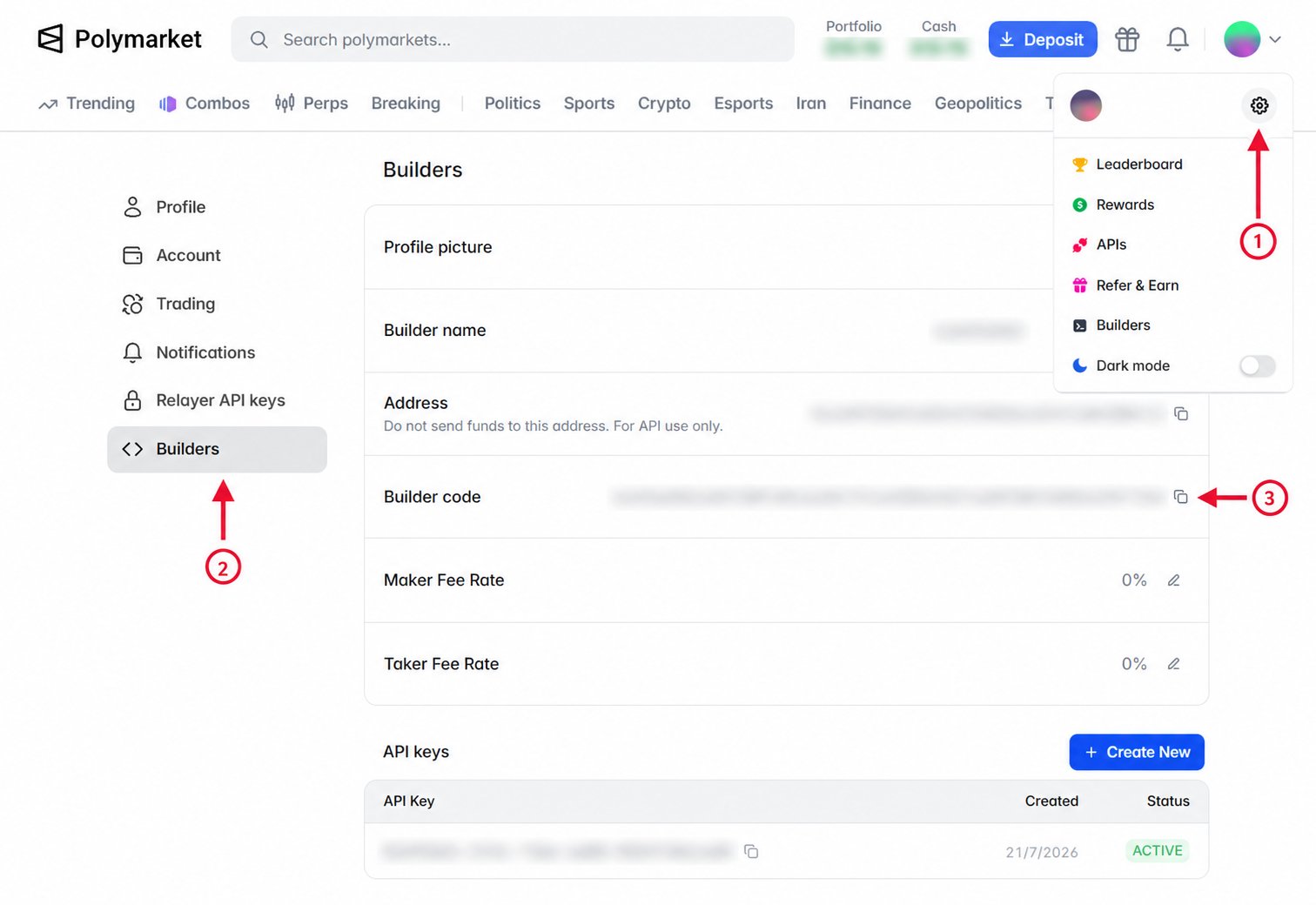
- TypeScript
- Python
- API
给定一个
SecureClient,下单时通过 builderCode 传入该代码:const response = await client.placeLimitOrder({
tokenId: yesTokenId,
side: OrderSide.BUY,
price: "0.52",
size: "10",
builderCode: process.env.POLYMARKET_BUILDER_CODE,
});
// response: OrderResponse
给定一个
AsyncSecureClient(同步代码使用 SecureClient),下单时通过
builder_code 传入该代码:response = await client.place_limit_order(
token_id=yes_token_id,
side="BUY",
price="0.52",
size="10",
builder_code=os.environ["POLYMARKET_BUILDER_CODE"],
)
# response: OrderResponse
签名前,将订单结构的
builder 字段设为你的构建者代码,以替代默认的 32 字节零值。
该代码会成为已签名订单的一部分,并将由此产生的交易归因到你的构建者资料。{
"deferExec": false,
"order": {
"builder": "<builder_code>",
"…": "…"
},
"orderType": "GTC",
"owner": "<clob_api_key>"
}
验证归因
归因订单撮合后,使用构建者代码查询构建者交易,以确认该交易已计入你的资料。 尚未撮合的订单不会出现在构建者交易结果中。- TypeScript
- Python
- API
通过
PublicClient 或 SecureClient 使用 listBuilderTrades,
然后获取匹配交易的第一页:const pages = client.listBuilderTrades({
builderCode: process.env.POLYMARKET_BUILDER_CODE,
});
const page = await pages.firstPage();
// page.items: BuilderTrade[]
通过
AsyncPublicClient 或 AsyncSecureClient 使用 list_builder_trades,
然后获取匹配交易的第一页。同步 PublicClient 和 SecureClient 提供相同的方法。pages = client.list_builder_trades(
builder_code=os.environ["POLYMARKET_BUILDER_CODE"],
)
page = await pages.first_page()
# page.items: tuple[BuilderTrade, ...]
构建者交易是公开读取,无需身份验证标头:使用响应中的
curl "https://clob.polymarket.com/builder/trades?builder_code=$POLYMARKET_BUILDER_CODE"
next_cursor 值请求后续页面。