> ## Documentation Index
> Fetch the complete documentation index at: https://docs.polymarket.com/llms.txt
> Use this file to discover all available pages before exploring further.
# Place Orders
> Learn how to place orders and control how they execute
Place a market order to trade against available liquidity immediately, or use a limit order to specify a price and wait for a match.
Before placing an order, choose an outcome token and confirm that the market is [accepting orders](/market-data/market-details#market-status). The examples below assume you already have a market object; to find or fetch one, see [Discover Markets](/market-data/discover-markets).
Given a market, read its outcome token IDs:
```ts theme={null}
const yesTokenId = market.outcomes.yes.tokenId!;
const noTokenId = market.outcomes.no.tokenId!;
```
Given a market, read its outcome token IDs:
```python theme={null}
if market.outcomes.yes.token_id is None or market.outcomes.no.token_id is None:
raise RuntimeError("Market token IDs not found")
yes_token_id = market.outcomes.yes.token_id
no_token_id = market.outcomes.no.token_id
```
Given a market object, its outcome token IDs are stored as a JSON-encoded
array:
```json theme={null}
{
"clobTokenIds": "[\"\", \"\"]"
}
```
Parse the array, then select the outcome you want to trade:
```bash theme={null}
TOKEN_ID=""
```
## Limit Orders
A limit order specifies the price at which you are willing to trade and can
rest on the book until it fills, expires, or you cancel it. Use one when price
control matters more than immediate execution.
A limit order also defines how long any unfilled amount remains active:
| Lifetime | Behavior | Use when |
| ------------------------- | ----------------------------------------------------- | --------------------------------------------- |
| Good Till Cancelled (GTC) | Remains active until it fills or you cancel it. | The order has no deadline. |
| Good Till Date (GTD) | Remains active until the expiration time you specify. | The order should expire before a known event. |
GTD orders expire one minute before their stated expiration as a security
threshold. To set an effective lifetime of N seconds, use `now + 60 + N`. In
addition, the expiration must be at least **3 minutes** in the future — orders
expiring sooner are rejected — so the minimum effective lifetime is about two
minutes.
### Place a Limit Order
Given a `SecureClient`, place the limit order and check its
response:
First, call `placeLimitOrder()` with the price and number of shares. The
price must follow the market's minimum price increment, and the size must
meet its minimum order size. Omit `expiration` for a GTC order or provide a
Unix timestamp in seconds for a GTD order.
```ts GTC theme={null}
import { OrderSide } from "@polymarket/client";
const response = await client.placeLimitOrder({
tokenId: yesTokenId,
side: OrderSide.BUY,
price: "0.52",
size: "10",
});
// response: OrderResponse
```
```ts GTD theme={null}
import { OrderSide } from "@polymarket/client";
const expiration = Math.floor(Date.now() / 1000) + 60 + 60 * 60;
const response = await client.placeLimitOrder({
tokenId: yesTokenId,
side: OrderSide.BUY,
price: "0.52",
size: "10",
expiration,
});
// response: OrderResponse
```
Both examples buy `10` shares at a price of `0.52` USD per share. The GTD
order has an effective lifetime of one hour.
Then, check `response.ok` to determine whether the CLOB accepted the order:
```ts theme={null}
if (response.ok) {
console.log(response.orderId, response.status);
console.log(response.tradeIds, response.transactionsHashes);
} else {
console.error(response.code, response.message);
}
```
An accepted response includes the order ID and one of these statuses. If
the order fills fully or partially, the `tradeIds` collection identifies
the resulting trades. When available, `transactionsHashes` contains their
transaction hashes:
| Status | Description |
| --------- | -------------------------------------------------------- |
| `live` | The order is resting on the book. |
| `matched` | The order matched immediately with resting liquidity. |
| `delayed` | The order is marketable but subject to a matching delay. |
A rejected order returns `ok: false` with a code and message.
Given an `AsyncSecureClient`, place the limit order and check
its response. The synchronous `SecureClient` provides the same method.
First, call `place_limit_order()` with the price and number of shares. The
price must follow the market's minimum price increment, and the size must
meet its minimum order size. Omit `expiration` for a GTC order or provide a
Unix timestamp in seconds for a GTD order.
```python GTC theme={null}
response = await client.place_limit_order(
token_id=yes_token_id,
side="BUY",
price="0.52",
size="10",
)
# response: OrderResponse
```
```python GTD theme={null}
import time
expiration = int(time.time()) + 60 + 60 * 60
response = await client.place_limit_order(
token_id=yes_token_id,
side="BUY",
price="0.52",
size="10",
expiration=expiration,
)
# response: OrderResponse
```
Both examples buy `10` shares at a price of `0.52` USD per share. The GTD
order has an effective lifetime of one hour.
Then, check `response.ok` to determine whether the CLOB accepted the order:
```python theme={null}
if response.ok:
print(response.order_id, response.status)
print(response.trade_ids, response.transactions_hashes)
else:
print(response.code, response.message)
```
An accepted response includes the order ID and one of these statuses. If
the order fills fully or partially, the `trade_ids` collection identifies
the resulting trades. When available, `transactions_hashes` contains their
transaction hashes:
| Status | Description |
| --------- | -------------------------------------------------------- |
| `live` | The order is resting on the book. |
| `matched` | The order matched immediately with resting liquidity. |
| `delayed` | The order is marketable but subject to a matching delay. |
A rejected order returns `ok=False` with a code and message.
Build the limit order from its price and size, then sign and submit it:
First, fetch the current order book to read the market's trading
constraints and exchange type:
```bash theme={null}
curl "https://clob.polymarket.com/book?token_id=$TOKEN_ID"
```
```json theme={null}
{
"asset_id": "",
"bids": [{ "price": "0.50", "size": "40" }],
"asks": [{ "price": "0.54", "size": "30" }],
"min_order_size": "5",
"tick_size": "0.01",
"neg_risk": false
}
```
Where:
* `min_order_size` is the minimum number of shares the CLOB accepts for an
order.
* `neg_risk` indicates whether the market belongs to a [negative-risk
group](/concepts/negative-risk) and therefore uses the
Neg Risk Exchange contract when signing and submitting the order.
Then, choose a price that conforms to `tick_size` and a share quantity that
meets `min_order_size`. Use the tick size to select the required precision:
| Tick size | Price decimals | Size decimals | Amount decimals |
| --------- | -------------: | ------------: | --------------: |
| `0.1` | 1 | 2 | 3 |
| `0.01` | 2 | 2 | 4 |
| `0.005` | 3 | 2 | 5 |
| `0.0025` | 4 | 2 | 6 |
| `0.001` | 3 | 2 | 5 |
| `0.0001` | 4 | 2 | 6 |
If your integration stores `tick_size` for later orders, listen for the
`tick_size_change` event on the [market
stream](/market-data/realtime-data#market-stream) and replace the stored value
when it changes. The CLOB rejects an order whose price does not conform to the
market's current tick size.
The two sides map the price and size differently:
* For a BUY, `makerAmount` is `price × size` USD and `takerAmount` is the
number of shares.
* For a SELL, `makerAmount` is the number of shares and `takerAmount` is
`price × size` USD.
Apply the table's precision in this order:
1. Express the price using no more than **Price decimals**.
2. Round the share quantity down to **Size decimals**.
3. Calculate the USD amount. If it exceeds **Amount decimals**, round it up
first to **Amount decimals + 4**, then down to **Amount decimals**.
Next, verify that the rounded share quantity still meets `min_order_size`,
then convert both amounts to six-decimal integers.
For a BUY of `10` shares at `0.52`, the USD amount is `5.20` and the share
quantity is above the minimum of `5`. The encoded values are:
```json theme={null}
{
"makerAmount": "5200000",
"takerAmount": "10000000"
}
```
Then, use the `neg_risk` value returned by the order book in the first step
to select the Exchange contract used as the EIP-712 verifying contract:
| Market | `exchange_address` |
| ------------- | -------------------------------------------- |
| Standard | `0xE111180000d2663C0091e4f400237545B87B996B` |
| Negative risk | `0xe2222d279d744050d28e00520010520000310F59` |
Then resolve the remaining placeholders for the account's wallet:
| Wallet | `signature_type` | `maker_address` | `order_signer_address` |
| -------------- | ---------------: | ---------------------- | ---------------------- |
| Deposit Wallet | `3` | Deposit Wallet address | Deposit Wallet address |
| Proxy Wallet | `1` | Proxy Wallet address | Account signer address |
| Safe Wallet | `2` | Safe Wallet address | Account signer address |
| EOA | `0` | EOA address | EOA address |
Next, create the EIP-712 typed data for the selected wallet:
```json Deposit Wallet Typed Data theme={null}
{
"domain": {
"name": "Polymarket CTF Exchange",
"version": "2",
"chainId": 137,
"verifyingContract": ""
},
"types": {
"Order": [
{ "name": "salt", "type": "uint256" },
{ "name": "maker", "type": "address" },
{ "name": "signer", "type": "address" },
{ "name": "tokenId", "type": "uint256" },
{ "name": "makerAmount", "type": "uint256" },
{ "name": "takerAmount", "type": "uint256" },
{ "name": "side", "type": "uint8" },
{ "name": "signatureType", "type": "uint8" },
{ "name": "timestamp", "type": "uint256" },
{ "name": "metadata", "type": "bytes32" },
{ "name": "builder", "type": "bytes32" }
],
"TypedDataSign": [
{ "name": "contents", "type": "Order" },
{ "name": "name", "type": "string" },
{ "name": "version", "type": "string" },
{ "name": "chainId", "type": "uint256" },
{ "name": "verifyingContract", "type": "address" },
{ "name": "salt", "type": "bytes32" }
]
},
"primaryType": "TypedDataSign",
"message": {
"contents": {
"salt": "479249096354",
"maker": "",
"signer": "",
"tokenId": "",
"makerAmount": "5200000",
"takerAmount": "10000000",
"side": 0,
"signatureType": 3,
"timestamp": "",
"metadata": "0x0000000000000000000000000000000000000000000000000000000000000000",
"builder": "0x0000000000000000000000000000000000000000000000000000000000000000"
},
"name": "DepositWallet",
"version": "1",
"chainId": 137,
"verifyingContract": "",
"salt": "0x0000000000000000000000000000000000000000000000000000000000000000"
}
}
```
```json Proxy, Safe, or EOA Typed Data theme={null}
{
"domain": {
"name": "Polymarket CTF Exchange",
"version": "2",
"chainId": 137,
"verifyingContract": ""
},
"types": {
"Order": [
{ "name": "salt", "type": "uint256" },
{ "name": "maker", "type": "address" },
{ "name": "signer", "type": "address" },
{ "name": "tokenId", "type": "uint256" },
{ "name": "makerAmount", "type": "uint256" },
{ "name": "takerAmount", "type": "uint256" },
{ "name": "side", "type": "uint8" },
{ "name": "signatureType", "type": "uint8" },
{ "name": "timestamp", "type": "uint256" },
{ "name": "metadata", "type": "bytes32" },
{ "name": "builder", "type": "bytes32" }
]
},
"primaryType": "Order",
"message": {
"salt": "479249096354",
"maker": "",
"signer": "",
"tokenId": "",
"makerAmount": "5200000",
"takerAmount": "10000000",
"side": 0,
"signatureType": 1,
"timestamp": "",
"metadata": "0x0000000000000000000000000000000000000000000000000000000000000000",
"builder": "0x0000000000000000000000000000000000000000000000000000000000000000"
}
}
```
Where:
* `side` is `0` for a BUY and `1` for a SELL.
* `salt` is a fresh random value for each order. Because the request body
serializes it as a JSON number, JavaScript integrations should keep it
within `Number.MAX_SAFE_INTEGER`.
Then, sign the typed data with the account signer. Deposit Wallets require
the raw signature to be wrapped for ERC-7739 validation. Proxy Wallets,
Safe Wallets, and EOAs submit the standard signature returned by signing
the Exchange `Order` typed data directly.
See the example below using Viem:
```js Deposit Wallet theme={null}
import { privateKeyToAccount } from "viem/accounts";
const signer = privateKeyToAccount(process.env.SIGNER_PRIVATE_KEY);
const innerSignature = await signer.signTypedData(typedData);
const signature = wrapDepositWalletSignature(typedData, innerSignature);
```
```js Proxy, Safe, or EOA theme={null}
import { privateKeyToAccount } from "viem/accounts";
const signer = privateKeyToAccount(process.env.SIGNER_PRIVATE_KEY);
const signature = await signer.signTypedData(typedData);
```
```js wrapDepositWalletSignature() theme={null}
import { concatHex, encodeAbiParameters, keccak256, toHex } from "viem";
const ORDER_TYPE =
"Order(uint256 salt,address maker,address signer,uint256 tokenId,uint256 makerAmount,uint256 takerAmount,uint8 side,uint8 signatureType,uint256 timestamp,bytes32 metadata,bytes32 builder)";
const EIP712_DOMAIN_TYPE =
"EIP712Domain(string name,string version,uint256 chainId,address verifyingContract)";
function wrapDepositWalletSignature(typedData, innerSignature) {
const order = typedData.message.contents;
const exchangeDomain = typedData.domain;
const appDomainSeparator = keccak256(
encodeAbiParameters(
[
{ type: "bytes32" },
{ type: "bytes32" },
{ type: "bytes32" },
{ type: "uint256" },
{ type: "address" },
],
[
keccak256(toHex(EIP712_DOMAIN_TYPE)),
keccak256(toHex(exchangeDomain.name)),
keccak256(toHex(exchangeDomain.version)),
BigInt(exchangeDomain.chainId),
exchangeDomain.verifyingContract,
],
),
);
const contentsHash = keccak256(
encodeAbiParameters(
[
{ type: "bytes32" },
{ type: "uint256" },
{ type: "address" },
{ type: "address" },
{ type: "uint256" },
{ type: "uint256" },
{ type: "uint256" },
{ type: "uint8" },
{ type: "uint8" },
{ type: "uint256" },
{ type: "bytes32" },
{ type: "bytes32" },
],
[
keccak256(toHex(ORDER_TYPE)),
BigInt(order.salt),
order.maker,
order.signer,
BigInt(order.tokenId),
BigInt(order.makerAmount),
BigInt(order.takerAmount),
order.side,
order.signatureType,
BigInt(order.timestamp),
order.metadata,
order.builder,
],
),
);
return concatHex([
innerSignature,
appDomainSeparator,
contentsHash,
toHex(ORDER_TYPE),
toHex(ORDER_TYPE.length, { size: 2 }),
]);
}
```
Choose how long the unfilled order should remain active in the final request
body. For a GTC order, set `orderType` to `"GTC"` and `expiration` to
`"0"`. For a GTD order, set `orderType` to `"GTD"` and `expiration` to a
Unix timestamp in seconds.
```bash GTC theme={null}
curl -X POST "https://clob.polymarket.com/order" \
-H "Content-Type: application/json" \
-H "POLY_ADDRESS: " \
-H "POLY_API_KEY: " \
-H "POLY_PASSPHRASE: " \
-H "POLY_SIGNATURE: " \
-H "POLY_TIMESTAMP: " \
--data '{
"deferExec": false,
"order": {
"builder": "0x0000000000000000000000000000000000000000000000000000000000000000",
"expiration": "0",
"maker": "",
"makerAmount": "5200000",
"metadata": "0x0000000000000000000000000000000000000000000000000000000000000000",
"salt": 479249096354,
"side": "BUY",
"signature": "",
"signatureType": 3,
"signer": "",
"takerAmount": "10000000",
"timestamp": "",
"tokenId": ""
},
"orderType": "GTC",
"owner": ""
}'
```
```bash GTD theme={null}
curl -X POST "https://clob.polymarket.com/order" \
-H "Content-Type: application/json" \
-H "POLY_ADDRESS: " \
-H "POLY_API_KEY: " \
-H "POLY_PASSPHRASE: " \
-H "POLY_SIGNATURE: " \
-H "POLY_TIMESTAMP: " \
--data '{
"deferExec": false,
"order": {
"builder": "0x0000000000000000000000000000000000000000000000000000000000000000",
"expiration": "",
"maker": "",
"makerAmount": "5200000",
"metadata": "0x0000000000000000000000000000000000000000000000000000000000000000",
"salt": 479249096354,
"side": "BUY",
"signature": "",
"signatureType": 3,
"signer": "",
"takerAmount": "10000000",
"timestamp": "",
"tokenId": ""
},
"orderType": "GTD",
"owner": ""
}'
```
Using the signer address and CLOB API credentials from [API
Authentication](/getting-started/api#authentication), create a fresh
`` and generate `` from the exact
serialized body sent over the wire:
```text theme={null}
body =
message = + "POST" + "/order" + body
clob_l2_signature = urlsafeBase64WithPadding(
HMAC-SHA256(base64Decode(), message)
)
```
Finally, check `success` to determine whether the CLOB accepted the order.
A successful response includes the order ID and its insertion status; a
failed response includes the reason in `errorMsg`:
```json Success theme={null}
{
"success": true,
"errorMsg": "",
"orderID": "",
"status": "live",
"makingAmount": "",
"takingAmount": "",
"transactionsHashes": [""],
"tradeIDs": [""]
}
```
```json Failure theme={null}
{
"success": false,
"errorMsg": "not enough balance / allowance",
"orderID": "",
"status": "",
"makingAmount": "",
"takingAmount": ""
}
```
A successful response has one of the following statuses. When the order
fills fully or partially, the `tradeIDs` collection identifies the
resulting trades. When available, `transactionsHashes` contains their
transaction hashes:
| Status | Description |
| ----------- | ----------------------------------------------------------------------- |
| `live` | The order is resting on the book. |
| `matched` | The order matched immediately with resting liquidity. |
| `delayed` | The order is marketable but subject to a matching delay. |
| `unmatched` | The order is marketable but failed to delay; placement still succeeded. |
### Post-Only Orders
A post-only order adds liquidity only: if it would match immediately against the
book, it is rejected instead of taking. Use it to guarantee you quote as a
maker.
Market makers use post-only orders to add liquidity with resting orders.
Given a `SecureClient`, set `postOnly` when placing the
limit order:
```ts theme={null}
const response = await client.placeLimitOrder({
tokenId: yesTokenId,
side: OrderSide.BUY,
price: "0.52",
size: "10",
postOnly: true,
});
// response: OrderResponse
```
Given an `AsyncSecureClient`, set `post_only` when placing
the limit order. The synchronous `SecureClient` provides the same method.
```python theme={null}
response = await client.place_limit_order(
token_id=yes_token_id,
side="BUY",
price="0.52",
size="10",
post_only=True,
)
# response: OrderResponse
```
Follow the API workflow in [Place a Limit Order](#place-a-limit-order), then
add `postOnly: true` to the final request alongside a GTC or GTD
`orderType`. For example, submit a GTC post-only order:
```bash theme={null}
curl -X POST "https://clob.polymarket.com/order" \
-H "Content-Type: application/json" \
-H "POLY_ADDRESS: " \
-H "POLY_API_KEY: " \
-H "POLY_PASSPHRASE: " \
-H "POLY_SIGNATURE: " \
-H "POLY_TIMESTAMP: " \
--data '{
"deferExec": false,
"order": {
"builder": "0x0000000000000000000000000000000000000000000000000000000000000000",
"expiration": "0",
"maker": "",
"makerAmount": "5200000",
"metadata": "0x0000000000000000000000000000000000000000000000000000000000000000",
"salt": 479249096354,
"side": "BUY",
"signature": "",
"signatureType": 3,
"signer": "",
"takerAmount": "10000000",
"timestamp": "",
"tokenId": ""
},
"orderType": "GTC",
"owner": "",
"postOnly": true
}'
```
## Market Orders
A market order uses the same underlying order as a limit order but derives a
marketable price from current order-book liquidity. This allows it to execute
immediately instead of resting on the book. Use a market order when execution
matters more than setting an exact price.
Read the market's [trading
constraints](/market-data/market-details#trading-constraints) before deciding
how much to buy or sell.
### Place a Market Order
The examples below use Fill and Kill (FAK), which fills available liquidity
immediately and cancels any remainder. See [Market Order
Types](#market-order-types) for Fill or Kill (FOK).
Given a `SecureClient`, estimate the price and place the
market order:
First, call `estimateMarketPrice()` to discover the price level the order
would reach at the current order-book depth. For a BUY, `amount` is the USD
notional to spend. For a SELL, `shares` is the number of shares to sell,
rather than their USD value.
```ts Buy theme={null}
import { OrderSide, OrderType } from "@polymarket/client";
const estimatedBuyPrice = await client.estimateMarketPrice({
tokenId: yesTokenId,
side: OrderSide.BUY,
amount: "10",
orderType: OrderType.FAK,
});
// estimatedBuyPrice: number
```
```ts Sell theme={null}
import { OrderSide, OrderType } from "@polymarket/client";
const estimatedSellPrice = await client.estimateMarketPrice({
tokenId: yesTokenId,
side: OrderSide.SELL,
shares: "10",
orderType: OrderType.FAK,
});
// estimatedSellPrice: number
```
In these examples, `amount: "10"` means spending \$10, while `shares: "10"`
means selling 10 shares.
The estimate is a snapshot of the current order book. The available price
can change before you submit the order.
Then, if the estimated price is acceptable, pass it as the maximum price
for a BUY or the minimum price for a SELL, and place the market order:
```ts Buy theme={null}
const response = await client.placeMarketOrder({
tokenId: yesTokenId,
side: OrderSide.BUY,
amount: "10",
maxPrice: estimatedBuyPrice,
orderType: OrderType.FAK,
});
// response: OrderResponse
```
```ts Sell theme={null}
const response = await client.placeMarketOrder({
tokenId: yesTokenId,
side: OrderSide.SELL,
shares: "10",
minPrice: estimatedSellPrice,
orderType: OrderType.FAK,
});
// response: OrderResponse
```
`maxPrice` prevents a BUY from crossing a higher price, while `minPrice`
prevents a SELL from crossing a lower one. If the book moves before
submission, the order may fill only partially or not at all.
Finally, check `response.ok` to determine whether the CLOB accepted the
order:
```ts theme={null}
if (response.ok) {
console.log(response.orderId, response.status);
console.log(response.tradeIds, response.transactionsHashes);
} else {
console.error(response.code, response.message);
}
```
An accepted response includes the order ID and one of these statuses. If
the order fills fully or partially, `tradeIds` identifies the resulting
trades. When available, `transactionsHashes` contains their transaction
hashes:
| Status | Description |
| --------- | -------------------------------------------------------- |
| `live` | The order is resting on the book. |
| `matched` | The order matched immediately with resting liquidity. |
| `delayed` | The order is marketable but subject to a matching delay. |
A rejected order returns `ok: false` with a code and message.
Given an `AsyncSecureClient`, estimate the price and place
the market order. The synchronous `SecureClient` provides the same methods.
First, call `estimate_market_price()` to discover the price level the order
would reach at the current order-book depth. For a BUY, `amount` is the USD
notional to spend. For a SELL, `shares` is the number of shares to sell,
rather than their USD value.
```python Buy theme={null}
estimated_buy_price = await client.estimate_market_price(
token_id=yes_token_id,
side="BUY",
amount="10",
order_type="FAK",
)
# estimated_buy_price: Decimal
```
```python Sell theme={null}
estimated_sell_price = await client.estimate_market_price(
token_id=yes_token_id,
side="SELL",
shares="10",
order_type="FAK",
)
# estimated_sell_price: Decimal
```
In these examples, `amount="10"` means spending \$10, while `shares="10"`
means selling 10 shares.
The estimate is a snapshot of the current order book. The available price
can change before you submit the order.
Then, if the estimated price is acceptable, pass it as the maximum price
for a BUY or the minimum price for a SELL, and place the market order:
```python Buy theme={null}
response = await client.place_market_order(
token_id=yes_token_id,
side="BUY",
amount="10",
max_price=estimated_buy_price,
order_type="FAK",
)
# response: OrderResponse
```
```python Sell theme={null}
response = await client.place_market_order(
token_id=yes_token_id,
side="SELL",
shares="10",
min_price=estimated_sell_price,
order_type="FAK",
)
# response: OrderResponse
```
`max_price` prevents a BUY from crossing a higher price, while `min_price`
prevents a SELL from crossing a lower one. If the book moves before
submission, the order may fill only partially or not at all.
Finally, check `response.ok` to determine whether the CLOB accepted the
order:
```python theme={null}
if response.ok:
print(response.order_id, response.status)
print(response.trade_ids, response.transactions_hashes)
else:
print(response.code, response.message)
```
An accepted response includes the order ID and one of these statuses. If
the order fills fully or partially, `trade_ids` identifies the resulting
trades. When available, `transactions_hashes` contains their transaction
hashes:
| Status | Description |
| --------- | -------------------------------------------------------- |
| `live` | The order is resting on the book. |
| `matched` | The order matched immediately with resting liquidity. |
| `delayed` | The order is marketable but subject to a matching delay. |
A rejected order returns `ok=False` with a code and message.
Market orders reuse the construction and signing flow from [Place a Limit
Order](#place-a-limit-order). Start from the current order book, calculate
market-order amounts, then build and sign the same Exchange order with
those values. The steps below call out what changes when the order should
execute against current liquidity:
First, fetch the current order book:
```bash theme={null}
curl "https://clob.polymarket.com/book?token_id=$TOKEN_ID"
```
```json theme={null}
{
"asset_id": "",
"bids": [{ "price": "0.50", "size": "40" }],
"asks": [
{ "price": "0.54", "size": "30" },
{ "price": "0.52", "size": "25" }
],
"min_order_size": "5",
"tick_size": "0.01",
"neg_risk": false
}
```
Estimate the price according to the order side:
* For a BUY, walk the asks from the best price upward and accumulate
`price × size` until the total reaches the USD amount you want to spend.
Use the final price as the maximum price.
* For a SELL, walk the bids from the best price downward until their
cumulative size reaches the number of shares you want to sell. Use the
final price as the minimum price.
In this example, a 10 USD BUY can fill entirely at `0.52`, so its maximum
price is `0.52`. Recalculate the estimate if the order book changes before
submission.
Use the precision table in the limit-order workflow above, but map the
amounts according to the side:
* For a BUY, `makerAmount` is the USD amount to spend and `takerAmount`
is `makerAmount ÷ maximum price` shares.
* For a SELL, `makerAmount` is the number of shares and `takerAmount` is
`makerAmount × minimum price` USD.
Round the price and input amount down to the table's **Price decimals** and
**Size decimals**. After calculating `takerAmount`, round it up first to
**Amount decimals + 4**, then to **Amount decimals**. This preserves the
maximum price for a BUY or the minimum price for a SELL.
A 10 USD BUY with a maximum price of `0.52` produces `19.2308` shares at a
tick size of `0.01`. This exceeds the five-share minimum in the order book.
Converted to six-decimal integers, the amounts are:
```json theme={null}
{
"makerAmount": "10000000",
"takerAmount": "19230800"
}
```
Use the order book's `neg_risk` value to select the Exchange contract, then
resolve the maker, signer, and signature type for the wallet as shown in
the limit-order workflow. Build the same EIP-712 order typed data, replacing
`makerAmount` and `takerAmount` with the market-order amounts calculated
above.
Sign with the account signer. Deposit Wallets use the `TypedDataSign`
payload and wrap the resulting signature for ERC-7739 validation; Proxy
Wallets, Safe Wallets, and EOAs sign the Exchange `Order` directly.
Set `orderType` to `"FAK"` and submit the order:
```bash theme={null}
curl -X POST "https://clob.polymarket.com/order" \
-H "Content-Type: application/json" \
-H "POLY_ADDRESS: " \
-H "POLY_API_KEY: " \
-H "POLY_PASSPHRASE: " \
-H "POLY_SIGNATURE: " \
-H "POLY_TIMESTAMP: " \
--data '{
"deferExec": false,
"order": {
"builder": "0x0000000000000000000000000000000000000000000000000000000000000000",
"expiration": "0",
"maker": "",
"makerAmount": "10000000",
"metadata": "0x0000000000000000000000000000000000000000000000000000000000000000",
"salt": 479249096354,
"side": "BUY",
"signature": "",
"signatureType": 3,
"signer": "",
"takerAmount": "19230800",
"timestamp": "",
"tokenId": ""
},
"orderType": "FAK",
"owner": ""
}'
```
Using the signer address and CLOB API credentials from [API
Authentication](/getting-started/api#authentication), create a fresh
`` and generate `` from the exact
serialized body sent over the wire:
```text theme={null}
body =
message = + "POST" + "/order" + body
clob_l2_signature = urlsafeBase64WithPadding(
HMAC-SHA256(base64Decode(), message)
)
```
Market orders must use an `expiration` of `"0"`.
Finally, check `success`. A FAK order may fill fully or partially; any
unfilled remainder is canceled. Successful fills are identified by
`tradeIDs`; `transactionsHashes` contains any transaction hashes available
when the response is returned. A rejected order explains the failure in
`errorMsg`:
```json Success theme={null}
{
"success": true,
"errorMsg": "",
"orderID": "",
"status": "matched",
"makingAmount": "",
"takingAmount": "",
"transactionsHashes": [""],
"tradeIDs": [""]
}
```
```json Failure theme={null}
{
"success": false,
"errorMsg": "not enough balance / allowance",
"orderID": "",
"status": "",
"makingAmount": "",
"takingAmount": ""
}
```
### Cap Market Buy Spending
A market BUY's amount is the pre-fee USD notional. Applicable [platform
fees](/market-data/market-details#trading-fees) and [builder taker
fees](/programs/builders/fees) are charged on top. Set an all-in spending limit
when the complete cost must remain within a fixed budget.
Set `maxSpend` to the most you want to spend, including fees:
```ts theme={null}
const response = await client.placeMarketOrder({
tokenId: yesTokenId,
side: OrderSide.BUY,
amount: "10",
maxSpend: "10",
maxPrice: estimatedBuyPrice,
orderType: OrderType.FAK,
});
```
Here, `amount: "10"` requests a 10 USD pre-fee buy, while `maxSpend: "10"`
caps the total spend at 10 USD. The SDK reduces the signed buy amount so
the order and its fees fit within the cap. Omit `maxSpend` to pay fees on
top of `amount`.
Set `max_spend` to the most you want to spend, including fees:
```python theme={null}
response = await client.place_market_order(
token_id=yes_token_id,
side="BUY",
amount="10",
max_spend="10",
max_price=estimated_buy_price,
order_type="FAK",
)
```
Here, `amount="10"` requests a 10 USD pre-fee buy, while `max_spend="10"`
caps the total spend at 10 USD. The SDK reduces the signed buy amount so
the order and its fees fit within the cap. Omit `max_spend` to pay fees on
top of `amount`.
Before signing, reduce `makerAmount` so the order notional plus applicable
platform and builder taker fees does not exceed the intended limit. Then
use the fee-adjusted value when calculating the market-order amounts above.
### Market Order Types
A market order uses one of two execution types, depending on whether a partial
fill is acceptable:
| Type | Behavior |
| ------------------- | ------------------------------------------------------------------------------------- |
| Fill and Kill (FAK) | Fills against the available liquidity immediately and cancels any unfilled remainder. |
| Fill or Kill (FOK) | Fills the entire order immediately or does not fill any of it. |
Set `orderType` when calling `placeMarketOrder()` on a `SecureClient`.
Fill and Kill is the default.
```ts FAK theme={null}
import { OrderSide, OrderType } from "@polymarket/client";
const response = await client.placeMarketOrder({
tokenId: yesTokenId,
side: OrderSide.BUY,
amount: "10",
orderType: OrderType.FAK,
});
// response: OrderResponse
```
```ts FOK theme={null}
import { OrderSide, OrderType } from "@polymarket/client";
const response = await client.placeMarketOrder({
tokenId: yesTokenId,
side: OrderSide.BUY,
amount: "10",
orderType: OrderType.FOK,
});
// response: OrderResponse
```
Set `order_type` when calling `place_market_order()` on an
`AsyncSecureClient`. Fill and Kill is the default, and the synchronous
`SecureClient` provides the same method.
```python FAK theme={null}
response = await client.place_market_order(
token_id=yes_token_id,
side="BUY",
amount="10",
order_type="FAK",
)
# response: OrderResponse
```
```python FOK theme={null}
response = await client.place_market_order(
token_id=yes_token_id,
side="BUY",
amount="10",
order_type="FOK",
)
# response: OrderResponse
```
`orderType` is not part of the signed EIP-712 order typed data. Set it to
`FAK` or `FOK` alongside the signed order in the top-level `/order` body:
```json theme={null}
{
"deferExec": false,
"order": { "…": "…" },
"orderType": "FOK",
"owner": ""
}
```
## Create and Post Separately
Create and sign an order without submitting it when you need to inspect it,
store it temporarily, or include it in a later batch.
Given a `SecureClient`, create the signed order locally,
then post it when ready:
```ts theme={null}
const signedOrder = await client.createLimitOrder({
tokenId: yesTokenId,
side: OrderSide.BUY,
price: "0.52",
size: "10",
});
// signedOrder: SignedOrder
const response = await client.postOrder(signedOrder);
// response: OrderResponse
```
Given an `AsyncSecureClient`, create the signed order
locally, then post it when ready. The synchronous `SecureClient` provides
the same methods.
```python theme={null}
signed_order = await client.create_limit_order(
token_id=yes_token_id,
side="BUY",
price="0.52",
size="10",
)
# signed_order: SignedOrder
response = await client.post_order(signed_order)
# response: OrderResponse
```
The API is inherently two-step: signing happens locally and submission is
a separate HTTP request. Build and sign the order as described in [Place a
Limit Order](#place-a-limit-order), then keep the signed order until you are
ready to submit it.
## Post a Batch of Orders
Submit several signed orders in one request. This is useful for placing a
ladder of quotes across multiple price levels when market making.
Given a `SecureClient`, create each signed order, then pass
them together to `postOrders()`:
```ts theme={null}
const firstOrder = await client.createLimitOrder({
tokenId: yesTokenId,
side: OrderSide.BUY,
price: "0.51",
size: "10",
});
const secondOrder = await client.createLimitOrder({
tokenId: yesTokenId,
side: OrderSide.BUY,
price: "0.52",
size: "10",
});
const responses = await client.postOrders([firstOrder, secondOrder]);
// responses: OrderResponse[]
```
```json Example theme={null}
[
{
"ok": true,
"orderId": "0x0827…",
"status": "live",
"makingAmount": "0",
"takingAmount": "0",
"transactionsHashes": [],
"tradeIds": []
},
{
"ok": true,
"orderId": "0x09f3…",
"status": "live",
"makingAmount": "0",
"takingAmount": "0",
"transactionsHashes": [],
"tradeIds": []
}
]
```
`postOrders` accepts between 1 and 15 signed orders per call. Each
entry in `responses` can independently be accepted or rejected, so check
`ok` on every entry rather than assuming the whole batch succeeded or
failed together.
Given an `AsyncSecureClient`, create each signed order, then
pass them together to `post_orders()`. The synchronous `SecureClient`
provides the same methods.
```python theme={null}
first_order = await client.create_limit_order(
token_id=yes_token_id,
side="BUY",
price="0.51",
size="10",
)
second_order = await client.create_limit_order(
token_id=yes_token_id,
side="BUY",
price="0.52",
size="10",
)
responses = await client.post_orders([first_order, second_order])
# responses: tuple[OrderResponse, ...]
```
```python Type theme={null}
tuple[OrderResponse, ...]
```
```json Example theme={null}
[
{
"ok": true,
"order_id": "0x0827…",
"status": "live",
"making_amount": "0",
"taking_amount": "0",
"trade_ids": [],
"transactions_hashes": []
},
{
"ok": true,
"order_id": "0x09f3…",
"status": "live",
"making_amount": "0",
"taking_amount": "0",
"trade_ids": [],
"transactions_hashes": []
}
]
```
`post_orders` accepts between 1 and 15 signed orders per call. Each
entry in `responses` can independently be accepted or rejected, so check
`ok` on every entry rather than assuming the whole batch succeeded or
failed together.
Send an array of 1 to 15 signed-order entries to `/orders`:
```bash theme={null}
curl -X POST "https://clob.polymarket.com/orders" \
-H "Content-Type: application/json" \
-H "POLY_ADDRESS: " \
-H "POLY_API_KEY: " \
-H "POLY_PASSPHRASE: " \
-H "POLY_SIGNATURE: " \
-H "POLY_TIMESTAMP: " \
--data '[
{
"deferExec": false,
"order": { "…": "…" },
"orderType": "GTC",
"owner": ""
},
{
"deferExec": false,
"order": { "…": "…" },
"orderType": "GTC",
"owner": ""
}
]'
```
Using the signer address and CLOB API credentials from [API
Authentication](/getting-started/api#authentication), create a fresh
`` and generate `` from the exact
serialized array sent over the wire:
```text theme={null}
body =
message = + "POST" + "/orders" + body
clob_l2_signature = urlsafeBase64WithPadding(
HMAC-SHA256(base64Decode(), message)
)
```
Each entry uses the same shape as a single `/order` request. The response
contains one result for each submitted order. For example, one order can
be accepted while another is rejected:
```json theme={null}
[
{
"success": true,
"errorMsg": "",
"orderID": "",
"status": "live",
"makingAmount": "",
"takingAmount": "",
"transactionsHashes": [],
"tradeIDs": []
},
{
"success": false,
"errorMsg": "not enough balance / allowance",
"orderID": "",
"status": "",
"makingAmount": "",
"takingAmount": ""
}
]
```
Check every result rather than treating the batch as a single success or
failure.
## Builder Attribution
As part of the [Builder Program](/programs/builders/overview), attach your
builder code to orders so matched trades are credited to your builder profile.
The code is a 32-byte hex string that identifies your profile.
### Attach Your Builder Code
In the builder account, open polymarket.com → Settings → Builders and copy the
**Builder Code** from your profile:
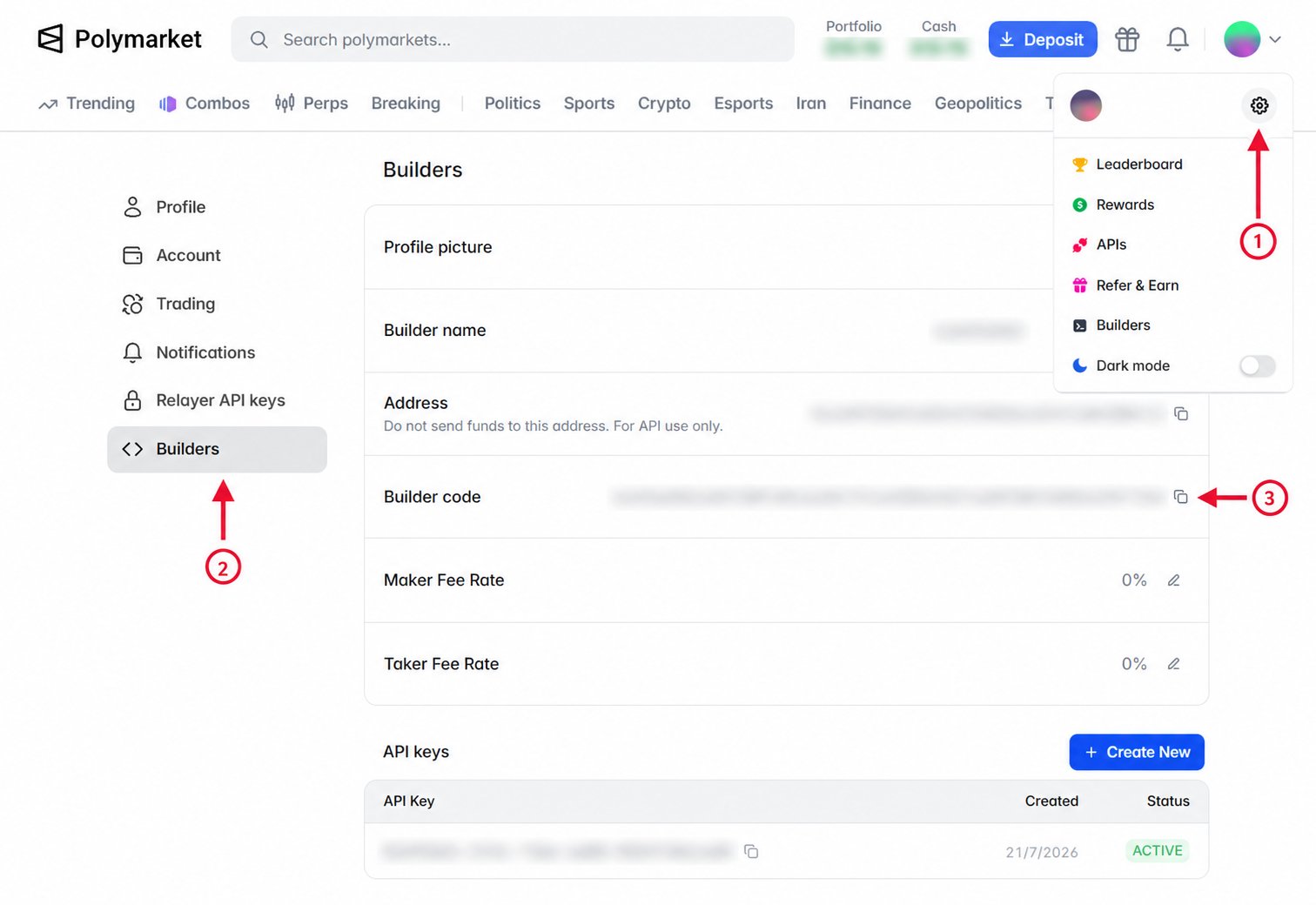 Include the builder code in every order you want attributed to your integration.
Because it is part of the signed order, add it before signing.
Given a `SecureClient`, pass the code as `builderCode` when
placing the order:
```ts theme={null}
const response = await client.placeLimitOrder({
tokenId: yesTokenId,
side: OrderSide.BUY,
price: "0.52",
size: "10",
builderCode: process.env.POLYMARKET_BUILDER_CODE,
});
// response: OrderResponse
```
Given an `AsyncSecureClient` (or `SecureClient` for synchronous code), pass
the code as `builder_code` when
placing the order:
```python theme={null}
response = await client.place_limit_order(
token_id=yes_token_id,
side="BUY",
price="0.52",
size="10",
builder_code=os.environ["POLYMARKET_BUILDER_CODE"],
)
# response: OrderResponse
```
Set the `builder` field of the order struct to your builder code before
signing, in place of its 32-byte zero default. The code becomes part of the
signed order and attributes any resulting trades to your builder profile.
```json theme={null}
{
"deferExec": false,
"order": {
"builder": "",
"…": "…"
},
"orderType": "GTC",
"owner": ""
}
```
### Verify Attribution
After an attributed order matches, query builder trades using your builder code
to confirm that the trade was credited to your profile. Orders that have not
matched do not appear in builder trade results.
Use `listBuilderTrades` with a `PublicClient` or `SecureClient`, then fetch
the first page of matching trades:
```ts theme={null}
const pages = client.listBuilderTrades({
builderCode: process.env.POLYMARKET_BUILDER_CODE,
});
const page = await pages.firstPage();
// page.items: BuilderTrade[]
```
Use `list_builder_trades` with an `AsyncPublicClient` or
`AsyncSecureClient`, then fetch the first page of matching trades. The
synchronous `PublicClient` and `SecureClient` provide the same method.
```python theme={null}
pages = client.list_builder_trades(
builder_code=os.environ["POLYMARKET_BUILDER_CODE"],
)
page = await pages.first_page()
# page.items: tuple[BuilderTrade, ...]
```
Builder trades are a public read and do not require authentication headers:
```bash theme={null}
curl "https://clob.polymarket.com/builder/trades?builder_code=$POLYMARKET_BUILDER_CODE"
```
Use the response's `next_cursor` value to request additional pages.
You can also monitor credited volume on the [Builder
Leaderboard](https://builders.polymarket.com). Allow up to 24 hours for matched
volume to appear there.
Include the builder code in every order you want attributed to your integration.
Because it is part of the signed order, add it before signing.
Given a `SecureClient`, pass the code as `builderCode` when
placing the order:
```ts theme={null}
const response = await client.placeLimitOrder({
tokenId: yesTokenId,
side: OrderSide.BUY,
price: "0.52",
size: "10",
builderCode: process.env.POLYMARKET_BUILDER_CODE,
});
// response: OrderResponse
```
Given an `AsyncSecureClient` (or `SecureClient` for synchronous code), pass
the code as `builder_code` when
placing the order:
```python theme={null}
response = await client.place_limit_order(
token_id=yes_token_id,
side="BUY",
price="0.52",
size="10",
builder_code=os.environ["POLYMARKET_BUILDER_CODE"],
)
# response: OrderResponse
```
Set the `builder` field of the order struct to your builder code before
signing, in place of its 32-byte zero default. The code becomes part of the
signed order and attributes any resulting trades to your builder profile.
```json theme={null}
{
"deferExec": false,
"order": {
"builder": "",
"…": "…"
},
"orderType": "GTC",
"owner": ""
}
```
### Verify Attribution
After an attributed order matches, query builder trades using your builder code
to confirm that the trade was credited to your profile. Orders that have not
matched do not appear in builder trade results.
Use `listBuilderTrades` with a `PublicClient` or `SecureClient`, then fetch
the first page of matching trades:
```ts theme={null}
const pages = client.listBuilderTrades({
builderCode: process.env.POLYMARKET_BUILDER_CODE,
});
const page = await pages.firstPage();
// page.items: BuilderTrade[]
```
Use `list_builder_trades` with an `AsyncPublicClient` or
`AsyncSecureClient`, then fetch the first page of matching trades. The
synchronous `PublicClient` and `SecureClient` provide the same method.
```python theme={null}
pages = client.list_builder_trades(
builder_code=os.environ["POLYMARKET_BUILDER_CODE"],
)
page = await pages.first_page()
# page.items: tuple[BuilderTrade, ...]
```
Builder trades are a public read and do not require authentication headers:
```bash theme={null}
curl "https://clob.polymarket.com/builder/trades?builder_code=$POLYMARKET_BUILDER_CODE"
```
Use the response's `next_cursor` value to request additional pages.
You can also monitor credited volume on the [Builder
Leaderboard](https://builders.polymarket.com). Allow up to 24 hours for matched
volume to appear there.